With Microsoft now firmly pushing Entity Framework (currently at version 4) as their preferred data access solution, it’s refreshing to see a couple of new players on the scene albeit perhaps not in direct competition.
Dapper (Dynamic Query Mapper) and PetaPoco are Mirco ORMs. An ORM is an Object Relational Mapper which sit between your business logic and database to abstract away the direct link between the two. Micro ORMs are a simplier and more efficient option to larger ORM frameworks such as EF4 and NHibernate.
In this demo (full source code downloadable from the links at the end of this article) I’ll be giving examples of how to use each of the frameworks against a SQL Server database for your CRUD (create/insert, read/select, update, delete) commands. I’m using the tempdb database so there' is no need to run any database scripts.
It’s important to note that for performance you still get a marginal benefit creating a hand coded DAL with SQLConnection, SQLCommand and all those SQLParameter objects like this:
public Customer Select()
{
    var customer = null;

    using (var connection = SqlHelper.GetOpenConnection())
    {
        using (var command = new SqlCommand(SqlHelper.ReadStatement, connection)
            { CommandType = CommandType.Text })
        {
            command.Parameters.Add("@Id", SqlDbType.Int);
            command.Parameters[0].Value = SqlHelper.TestId;

            var reader = command.ExecuteReader();

            while (reader.Read())
            {
                customer = new Customer()
                {
                    CustomerId = reader.GetString(0),
                    CompanyName = reader.GetString(1)
                };

            }
        }
    }

    return customer;
}
But to hand code your own entire DAL is pretty time consuming and hard to maintain particularly when you’ve got commands with plenty of parameters. Now you could use T4 to generate your DAL based on your database schema and that’s probably still your best bet if performance is everything to your application. Or, for a minimal perf overhead (most LOB apps wouldn’t notice) you could use one of our new Micro ORMs!
To carry out the same task as the hand coded DAL above, Dapper requires only two lines of code:
var mapperConnection = SqlHelper.GetOpenConnection();
mapperConnection.Query<Customer>(SqlHelper.ReadStatement, new { Id = SqlHelper.TestId });
Note: This is using the (customer) typed Query, you can also use a dynamic version that omits the generic parameter of Customer to return a Dynamic Object. Dynamic Objects were introduced in .NET Framework 4.
For PetaPoco only three lines of code are required:
var petaPoco = new PetaPoco.Database(SqlHelper.ConnectionString, "System.Data.SqlClient");
petaPoco.OpenSharedConnection();
var customer = petaPoco.Fetch<Customer>(SqlHelper.ReadStatement, SqlHelper.TestId);
Note: This example is using the default execution options, you can also tweak the options to boost performance shown later in this blog.
You can see from a RAD point of view Micro ORMs really come into their own compared to hand coding your DAL. Since the start of .NET plenty of frameworks have been created to generate your Sql commands and parameters (based on your DAL method attributes or parameters) but these Micro ORM frameworks are special.
Firstly, other than one file for each framework no other code is required to pollute your solution. No attributes clogging up your DAL or DTOs or Business Layers. But now for the really special bit, both frameworks are actually generating code dynamically using Dynamic Methods and ILGenerators which is pretty cool and inspiring stuff. The source code for both frameworks are included in the source code download to this blog post and I encourage you to take a look – kudos to the guys that put these frameworks together!
In terms of performance, the full Dapper project (link also at the end of the post) includes a test project that runs a simple select statement 500 times and compares performance against various data access solutions, the results of which can be seen here:

Note: Dapper is named as Mapper Query when using the typed/generic read method and Dynamic Mapper Query when using the non generic method.
2nd Note: This code was produced on a travel netbook (I’m writing this blog post whilst stuck in Delhi airport for the night being eaten alive by mosquitos :) ). I would expect the figures to be much faster on a newer PC or laptop.
Examples for C, R, U and D code
Dapper
private static void DapperExamples()
{
    Console.WriteLine("Running Dapper examples");

    SqlConnection mapperConnection = SqlHelper.GetOpenConnection();

    // CREATE
    mapperConnection.Execute(SqlHelper.CreateStatement,
                                new
                                    {
                                        Id = SqlHelper.TestId,
                                        CompanyName = SqlHelper.InsertCompanyName
                                    });

    // READ Mapper Query
    IEnumerable<Customer> customer1 =
        mapperConnection.Query<Customer>(SqlHelper.ReadStatement, new {Id = SqlHelper.TestId});

    // READ Dynamic Object Mapper Query
    var customer2 = mapperConnection.Query(SqlHelper.ReadStatement, new {Id = SqlHelper.TestId});

    // UPDATE
    mapperConnection.Execute(SqlHelper.UpdateStatement,
                                new
                                    {
                                        Id = SqlHelper.TestId,
                                        CompanyName = SqlHelper.UpdateCompanyName
                                    });

    // DELETE
    mapperConnection.Execute(SqlHelper.DeleteStatement, new {Id = SqlHelper.TestId});
}
PetaPoco
private static void PetaPocoExamples()
{
    Console.WriteLine("Running PetaPoco examples");

    var petapoco = new Database(SqlHelper.ConnectionString, "System.Data.SqlClient");
    petapoco.OpenSharedConnection();

    // CREATE
    petapoco.Execute(SqlHelper.CreateStatementWithIndexedParams, SqlHelper.TestId, SqlHelper.InsertCompanyName);

    // READ with all default options
    List<Customer> customer1 = petapoco.Fetch<Customer>(SqlHelper.ReadStatementWithIndexedParams,
                                                        SqlHelper.TestId);

    // READ with some "smart" functionality disabled
    var petapocoFast = new Database(SqlHelper.ConnectionString, "System.Data.SqlClient");
    petapocoFast.OpenSharedConnection();
    petapocoFast.EnableAutoSelect = false;
    petapocoFast.EnableNamedParams = false;
    petapocoFast.ForceDateTimesToUtc = false;
    List<Customer> customer2 = petapocoFast.Fetch<Customer>(SqlHelper.ReadStatementWithIndexedParams,
                                                            SqlHelper.TestId);

    // UPDATE
    petapoco.Execute(SqlHelper.UpdateStatementWithIndexedParams, SqlHelper.TestId, SqlHelper.UpdateCompanyName);

    // DELETE
    petapoco.Execute(SqlHelper.DeleteStatementWithIndexedParams, SqlHelper.TestId);
}
SqlHelper class
internal static class SqlHelper
{
    public static readonly string ConnectionString =
        @"Data Source=.;Initial Catalog=tempdb;Integrated Security=True";

    public static readonly string CreateStatement =
        @"INSERT dbo.Customers (CustomerID, CompanyName) SELECT @id, @companyName";

    public static readonly string ReadStatement = @"SELECT * FROM dbo.Customers WHERE CustomerId = @id";

    public static readonly string UpdateStatement =
        @"UPDATE dbo.Customers SET CompanyName = @companyName WHERE CustomerId = @id";

    public static readonly string DeleteStatement = @"DELETE FROM dbo.Customers WHERE CustomerId = @id";

    // PetaPoco parameters are named based on index
    public static readonly string CreateStatementWithIndexedParams =
        @"INSERT dbo.Customers (CustomerID, CompanyName) SELECT @0, @1";

    public static readonly string ReadStatementWithIndexedParams =
        @"SELECT * FROM dbo.Customers WHERE CustomerId = @0";

    public static readonly string UpdateStatementWithIndexedParams =
        @"UPDATE dbo.Customers SET CompanyName = @1 WHERE CustomerId = @0";

    public static readonly string DeleteStatementWithIndexedParams =
        @"DELETE FROM dbo.Customers WHERE CustomerId = @0";


    public static readonly string TestId = "TEST";
    public static readonly string InsertCompanyName = "Inserted company";
    public static readonly string UpdateCompanyName = "Updated company";

    internal static void EnsureDbSetup()
    {
        using (var cnn = GetOpenConnection())
        {
            var cmd = cnn.CreateCommand();
            cmd.CommandText = @"
if (OBJECT_ID('Customers') is null)
begin
CREATE TABLE [dbo].[Customers](
  [CustomerID] [nchar](5) NOT NULL,
  [CompanyName] [nvarchar](40) NOT NULL,
  [ContactName] [nvarchar](30) NULL,
  [ContactTitle] [nvarchar](30) NULL,
  [Address] [nvarchar](60) NULL,
  [City] [nvarchar](15) NULL,
  [Region] [nvarchar](15) NULL,
  [PostalCode] [nvarchar](10) NULL,
  [Country] [nvarchar](15) NULL,
  [Phone] [nvarchar](24) NULL,
  [Fax] [nvarchar](24) NULL)
end
";
            cmd.Connection = cnn;
            cmd.ExecuteNonQuery();
        }
    }

    public static SqlConnection GetOpenConnection()
    {
        var connection = new SqlConnection(ConnectionString);
        connection.Open();
        return connection;
    }
}
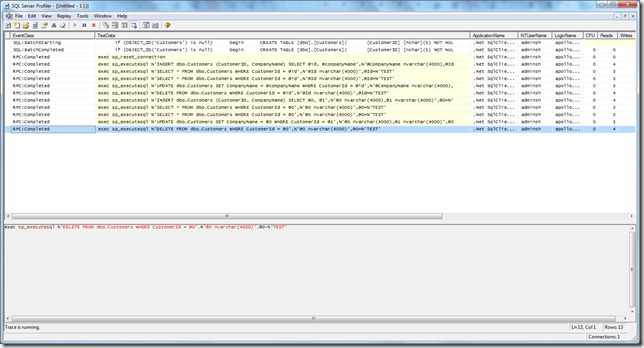
SQL Profiler
Using SQL Profiler we can view the TSQL that is being sent by Dapper and PetaPoco:
I hope you find this article helpful, happy coding!
Downloads
Blog source code (including source for Dapper and PetaPoco): http://www.stevenhollidge.com/blog-source-code/MicroOrmDemo.zip
Dapper (includes performance tests comparing Data Access solutions): http://code.google.com/p/dapper-dot-net/
PetaPoco: http://www.toptensoftware.com/petapoco/


