Tuesday, 28 February 2012

Metro styled UI

Here’s some offerings from 3rd party tool vendors Dev Express and Telerik to provide some inspiration for the new wave of metro styled apps.

I’ve also included some screen shots from Microsoft via their Azure and Visual Studio vNext offerings.

telerik2

 devexpress1 devexpress2 devexpress3 telerik1

azureazure0azure01azure2azure4azure5

teleriktelerik2telerik3

image

VS-11-splash

image

ddd3

ddd2

inkedin-ipad

image

image

dynamics1fmifmi2fmi3fmi4fmi5metro-exampleproject-approval

metro-ui

image_3C2AF10Eimage_7A043632image_26A89051image_57A840FEimage_3938DEB3image_04538B89image_08606A0C

1754.Desktop_App_Listing_thumb_41E8AD425468.Store_Search_Results_thumb_7B6BBD39

backgroundImagesMSN Money Panorama

dutch prosecutor (1)-580-90beer hunter app (2)-580-90beer hunter app (1)-580-90

Forward to 48 minutes to view video demo of the Ultimate Beer Ranger Windows 8 app:

http://www.youtube.com/watch?v=4MY4Ojs5ASQ

6c88c98egallerypost16518337185-microsoft-office-15-word-previewword_02Office-15-screenshotfeedbackwin8-filesxbox

http://www.winsupersite.com/article/office/quick-peek-office-15-beta-refresh-142905

mossy-blog1

metro1metro2metro3metro4metro5metro6metro7metro8metro9metro10metro11metro12metro14metro15metro16metro17metro18metro19metro20metro21metro22metro23metro24metro25metro26metro27metro-workflow

chooseanoption

The next set of images come from the Microsoft Office Future Vision videos:

http://www.microsoft.com/office/vision/

image

image

image

image

image

image

image

image

image

image

image

image

image

image

image

image

image

image

image

image

image

image

image

image

image

image

image

metro546175_10151109295888721_547945796_n

image

image

image

12

1 (2)2

Saturday, 18 February 2012

TryExecute with timeout and maxAttempts

A nice piece of code for calling services with a timeout and maximum attempts, in case the service should cause an exception.

It follows the standard practise for "Try" in .Net, like TryParse, of returning a boolean to indicate success and the result as an out parameter. Should you wish to find out the exception that may have occurred this is also passed as an out parameter.

I've also included an Execute mthod that will raise an exception should the service request timeout or fail more than the maximum number of attempts,

The source code solution includes unit tests in MBUnit, NUnit, xUnit and MSTest:

http://stevenhollidge.com/blog-source-code/TryExecute.zip

Friday, 17 February 2012

Rx Event Example

When subscribing to events Reactive Extensions (Rx) is a powerful way to filter, throttle and compose your .Net code. 

With this example I have a WPF application that listens to a FxRate pricing service, that’s pumping out 100 new prices a second via an event.

I’m going to make available the code to show how to hook up the front end Metro style application using MVVM with:

  • old skool event handlers
  • and then using Reactive Extensions (Rx)

Finally we update the Rx example to filter on just one of the exchange rates and also throttle back the rate of FxRates being received to one per second.

stockmarket-demo

The event signature

Old skool event handlers

Using MVVM, here we have my view model code stripped back just to show we have:

  • A pricing service
  • A subscribed command (data bound to the subscribed button on the UI) which toggles the subscribed property
  • A delegate (PriceUpdate) that handles the event when the subscribed button is clicked.  Click the button a second time to unsubscribe and remove the delegate from handling the event

Lines 25 and 30 show the adding and removal of the event handler, dependent on whether the user has clicked the subscribe button.

Rx Subscriptions

To do the same thing with Rx takes two lines of code (lines 18/19 and 21)

Filtering with Rx

Simply update our subscription to include a where filter that accepts the event coming in (e) and sets the predicate to Ccy (Currency) for the exchange to Euro to GBP.

Throttling with Rx

NOTE:  The code below was a workaround, please use Sample as shown here.

So we have filtered the events to only give us the Euro to GBP prices. Now let's enhance the solution just to give us the latest Euro to GBP price every two seconds.

Source code

Event handlers:  http://stevenhollidge.com/blog-source-code/standard-event-handler-wpf-metro-mvvm-stockmarket-pricing-app.zip

Reactive Extensions:  http://stevenhollidge.com/blog-source-code/Rx-wpf-metro-mvvm-stockmarket-pricing-app.zip

Wednesday, 15 February 2012

WPF Metro MVVM Application

This project is designed to get developers up and running on their WPF Metro MVVM projects.

Screenshots

image

 ScreenShot1 ScreenShot2 ScreenShot3 ScreenShot4

Frameworks

This project combines two excellent existing frameworks within the community:

Name Developer Link Comments
MahApps.Metro Paul Jenkins

http://www.theleagueofpaul.com/metro

Metro style and themes
MVVM Light Toolkit Laurent Bugnion http://mvvmlight.codeplex.com/ Originally based on ideas and source code from Microsoft PRISM

Concepts

The application contains working examples of the following:

  • MVVM with INPC (INotifyPropertyChanged), Messenger with messages (for event notifications), RelayCommands are available to use
  • Metro layout, styles and theming, easing and sliding from “outside” the visual area – all thanks to MapApps, great library!
  • Two way data binding for a combo box to a Enum list

image

ViewModel Example

Source code 

http://stevenhollidge.com/blog-source-code/wpf-metro-mvvm-app-stockmarket.zip

Tuesday, 14 February 2012

Reactive Extensions (Rx)

Overview

MSDN Definition

“Rx is a library to compose asynchronous and event-based programs using observable collections and LINQ-style query operators.”

Rx provides extension methods on top of Linq to enable developers to implement the observer pattern on query results (IEnumerables e.g. a collection or sequence).

The benefits of Rx are in it’s enabling of concurrency and it’s composability.  It allows for easy concurrent processing over a collection along with simple declarative call backs on completion and exceptions.  This programming model allows for simple orchestration of async operations.

To get familiar with Rx, in the examples below we’ll look at simple enumerations of data to get a feel for the programming style.  We can then take a look at Rx for events, with events after all just being a sequence of data (found in the EventArgs).

How To Get Reactive Extensions

Use Nuget, search for Rx and bring in the Reactive.Main library (System.Reactive namespace).

rx-Nuget

Simple example

1.Convert the linq query into an observable (using the Rx extension method).

2. Write a delegate which will execute for:

  • Each item in the enumeration (OnNext method in the examples below)
  • When an error occurs (OnError method in the examples below)
  • When the enumeration completes (OnCompleted method in the examples below)

3. Subscribe to the query results.  This is whether you hook up each of your delegates and start the enumeration.

rx-Simple

“Finally” delegate

There is another delegate we can set, that runs after the processing has completed, regardless of whether the enumeration successfully got the end of the sequence or not e.g. An error occurred half way through processing so the completed delegate doesn’t run.  The Finally delegate will always run which might be useful for clean up.

rx-FinallyDelegate

How to Configure Threading

rx-HowToConfigureThreads

Notice how all the "getting" and "processing" are sequential and in keeping with the enumeration (within each group) even though the processing might be occurring on different threads.

Early Cancellation of Processing

You can cancel the processing of a collection, here is an example:

rx-EarlyCancellation

“Using” A Disposable Object

This example code disposes of an object after the completed delegate has run.

rx-UsingDisposableObjects

A real world example may look like this:

Demo Source Code

You can download the demo here:  http://stevenhollidge.com/blog-source-code/RxExtensionsDemo.zip

Monday, 23 January 2012

Concurrency Checker

Useful piece of code when checking for concurrency in your application.

using System;
using System.Threading;

namespace Utilities
{
public class ConcurrencyCheck : IDisposable
{
private static int _concurrencyCount = 0;

public ConcurrencyCheck()
{
var usage = 0;
if ((usage = Interlocked.Increment(ref _concurrencyCount)) != 1)
{
Console.WriteLine("{0} delegates are running concurrently", usage);
}
}

public void Dispose()
{
Interlocked.Decrement(ref _concurrencyCount);
}
}
}

T4 Example: Code Generation

This simple T4 example shows how to generate a C# enum class from an external resource, in this case a SQL database.

First of all, let’s create our database:

USE [master]
GO

CREATE DATABASE [T4Demo]
GO

USE [T4Demo]
GO

CREATE TABLE [dbo].[AssetClass](
[Id] [int] IDENTITY(1,1) NOT NULL,
[Description] [varchar](50) NOT NULL,
CONSTRAINT [PK_AssetType] PRIMARY KEY CLUSTERED ( [Id] ASC )
)
GO

INSERT [AssetClass] VALUES ('Equity');
INSERT [AssetClass] VALUES ('Fixed Income');
INSERT [AssetClass] VALUES ('Cash');
GO

Next we’ll create a C# console application and add a T4 text template file:

<#@ template debug="false" hostspecific="true" language="C#" #>
<#@ output extension=".cs" #>
<#@ assembly name="System.Data" #>
<#@ import namespace="System.Data.SqlClient" #>
<#@ import namespace="System.Text.RegularExpressions" #>
<#@ import namespace="System.IO" #>

public enum <#= Path.GetFileNameWithoutExtension(Host.TemplateFile) #>
{
<#
if(Validate())
{
BuildEnum();
}
#>
}

<#+

private bool Validate()
{
if(string.IsNullOrEmpty(Server)) { Error("No server was specified"); }
if(string.IsNullOrEmpty(Database)) { Error("No database was specified"); }
if(!IntegratedSecurity)
{
if(string.IsNullOrEmpty(User)) { Error("No user id was specified"); }
if(string.IsNullOrEmpty(Pwd)) { Error("No password was specified"); }
}

if(string.IsNullOrEmpty(Table)) { Error("No table was specified"); }
if(string.IsNullOrEmpty(ValueColumn)) { Error("The value column was specified"); }
if(string.IsNullOrEmpty(TextColumn)) { Error("The text column was specified"); }

return !this.Errors.HasErrors;
}

private void BuildEnum()
{
using (SqlConnection conn = new SqlConnection(BuildConnStr()))
{
SqlCommand cmd = conn.CreateCommand();
cmd.CommandText = string.Format(
"select {0}, {1} from {2}",
ValueColumn,
TextColumn,
Table);
cmd.CommandType = System.Data.CommandType.Text;

conn.Open();
SqlDataReader rdr = cmd.ExecuteReader();

PushIndent("\t");
while (rdr.Read())
{
string enm = string.Format("{0} = {1},",
CreateValidIdentifier(rdr[TextColumn].ToString()),
rdr[ValueColumn].ToString());
WriteLine(enm);
}

WriteLine("Unknown = 0");
PopIndent();
rdr.Close();
conn.Close();
}
}

// Strips spaces and full stops
private string CreateValidIdentifier(string input)
{
string pattern = @"[\.\[\]\s]";
Regex regex = new Regex(pattern, RegexOptions.None);
return regex.Replace(input, "");
}

private string BuildConnStr()
{
SqlConnectionStringBuilder csb = new SqlConnectionStringBuilder();
csb.DataSource = Server;
csb.InitialCatalog = Database;
csb.IntegratedSecurity = IntegratedSecurity;

if(!IntegratedSecurity)
{
csb.UserID = User;
csb.Password = Pwd;
}

return csb.ConnectionString;
}

private string Server = ".";
private string Database = "T4Demo";
private bool IntegratedSecurity = true;
private string User = "";
private string Pwd = "";
private string Table = "dbo.AssetClass";
private string ValueColumn = "Id";
private string TextColumn = "Description";

#>

Now save the file and you'll have your own up-to-date enum class driven from your database:

public enum AssetClass
{
Equity = 1,
FixedIncome = 2,
Cash = 3,
Unknown = 0
}

You can also set up Visual Studio to always regenerate the file on each build if you prefer.


Source code:  http://stevenhollidge.com/blog-source-code/T4CodeGenerationEnums.zip

Wednesday, 18 January 2012

JavaScript MVVM: Knockout.js

Knockout.js is a rich JavaScript MVVM framework for data binding HTML elements to JavaScript view models, auto UI updates, dependency tracking and templating.

For a Silverlight or WPF developer this is just what we’ve wanted to be able to unit test our presentation layer (the View Model) outside of the UI.

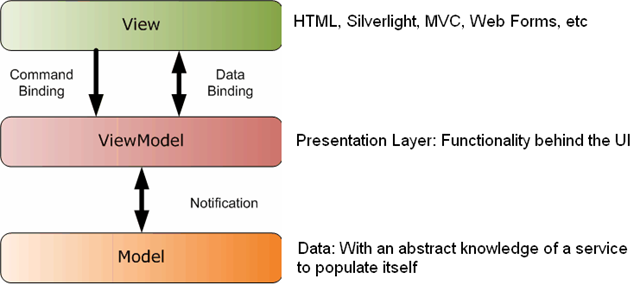
MVVM

Overview
image

Example of an implementation of MVVM

MVVM_05

Knockout.js

Home page http://knockoutjs.com/
Source code: https://github.com/SteveSanderson/knockout
Resources: http://www.knockmeout.net/   
http://blog.stevesanderson.com
http://en.wikipedia.org/wiki/Model_View_ViewModel


A simple Knockout.js example

 image

Live demo:  http://c9.io/stevenh77/knockoutdemo/workspace/demo1.html

In this example we will be:

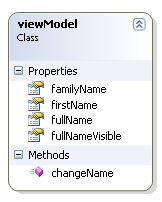
Diagram

Steps

image 1. Creating a view model in JavaScript called viewModel (see diagram).
2. Three of the properties will be ko.observables which enables data binding:
        firstName, familyName and fullNameVisible
3. firstname and familyName bound to textboxes.
4. Enforce the update of the viewModel properties after every key press by adding:
        valueUpdate: 'afterkeydown'  to the data-bind section of the textboxes
5. Binding the checked property of the checkbox to fullNameVisible along with the label.visible property.
6. Create a fourth dependentObservable property called fullName, which is dependent on firstName
and familyName and databound to “Hello {fullName}” label.

7. Bind the changeName function to the Change Name button, which updates firstName and familyName.

<!DOCTYPE html>
<html>
<head>
<script src="http://cloud.github.com/downloads/SteveSanderson/knockout/knockout-2.0.0rc.debug.js" type="text/javascript"></script>
<script src="https://ajax.googleapis.com/ajax/libs/jquery/1.7.1/jquery.js" type="text/javascript"></script>
<script type="text/javascript">
$(function () {
var viewModel = {
firstName: ko.observable("Bob"),
familyName: ko.observable("Smith"),
changeName: function () {
this.firstName("Joe");
this.familyName("Bloggs");
},
fullNameVisible: ko.observable(true),
};
viewModel.fullName = ko.dependentObservable(function() {
return this.firstName() + " " + this.familyName();
}, viewModel);
ko.applyBindings(viewModel);
});
</script>
</head>
<body>
<div>Stockbroker:
<input type="text" data-bind="value: firstName, valueUpdate: 'afterkeydown'" />
<input type="text" data-bind="value: familyName, valueUpdate: 'afterkeydown'" />
<input type="checkbox" data-bind="checked: fullNameVisible" />
<span>Hello </span><span data-bind="text: fullName, visible: fullNameVisible"></span>
<button data-bind="click: changeName">Change name</button>
</div>
</body>
</html>

Observable Arrays


Here is an example showing lists of data with validating input controls


Live demo:  http://c9.io/stevenh77/knockoutdemo/workspace/demo2.html


image

<!DOCTYPE html>
<html>
<head>
<script src="http://cloud.github.com/downloads/SteveSanderson/knockout/knockout-2.0.0rc.debug.js" type="text/javascript"></script>
<script src="https://ajax.googleapis.com/ajax/libs/jquery/1.7.1/jquery.js" type="text/javascript"></script>
<script src="http://ajax.microsoft.com/ajax/jQuery.Validate/1.6/jQuery.Validate.min.js" type="text/javascript"></script>
<script type="text/javascript">
$(function () {
var TradeModel = function(trades) {
var self = this;
self.trades = ko.observableArray(trades);

self.addTrade = function() {
self.trades.push({
ticker: "",
price: ""
});
};

self.removeTrade = function(trade) {
self.trades.remove(trade);
};

self.save = function(form) {
alert("Could now transmit to server: " + ko.utils.stringifyJson(self.trades));
// To actually transmit to server as a regular form post, write this: ko.utils.postJson($("form")[0], self.gifts);
};
};

var viewModel = new TradeModel([
{ ticker: "MSFT", price: "39.95"},
{ ticker: "AAPL", price: "120.00"}
]);

ko.applyBindings(viewModel);

// Activate jQuery Validation
$("form").validate({ submitHandler: viewModel.save });
});
</script>
</head>
<body>
<form action='/someServerSideHandler'>
<p>You have entered <span data-bind='text: trades().length'>&nbsp;</span> trade(s)</p>
<table data-bind='visible: trades().length > 0'>
<thead>
<tr>
<th>Ticker</th>
<th>Price</th>
<th />
</tr>
</thead>
<tbody data-bind='foreach: trades'>
<tr>
<td><input placeholder='Ticker' class='required' data-bind='value: ticker, uniqueName: true' /></td>
<td><input placeholder='Price' class='required number' data-bind='value: price, uniqueName: true' /></td>
<td><a href='#' data-bind='click: $root.removeTrade'>Delete</a></td>
</tr>
</tbody>
</table>

<button data-bind='click: addTrade'>Add Trade</button>
<button data-bind='enable: trades().length > 0' type='submit'>Submit</button>
</form>
</body>
</html>

Bindings

Built in binding

These bindings come out of the box


Text and Appearancevisible, text, html, css, style, attr
FormsClick, Event, Submit, Enable, Disable, Value, Checked, Options/Selected options (for dropdown or multi select)
Control Flowif, ifnot, foreach, with
TemplateOld:  Traditional JavaScript template (<script>)
New:  Inline, template less, comment based syntax

Custom bindings


Sometimes it’s preferred to use custom bindings over the built in bindings as it can keep your code more reusable and succinct.

ko.bindingHandlers.yourBindingName = {
init: function(element, valueAccessor, allBindingsAccessor, viewModel) {
// This will be called when the binding is first applied to an element
// Set up any initial state, event handlers, etc. here
},
update: function(element, valueAccessor, allBindingsAccessor, viewModel) {
// This will be called once when the binding is first applied to an element,
// and again whenever the associated observable changes value.
// Update the DOM element based on the supplied values here.
}
};

KO Utilities


Knockout protected observable:  Allows you to commit or undo changes to your observable data item, sweet!


Data features


You can use the built in Knockout functions to convert to |JavaScript and JSON:  ko.ToJS() and ko.ToJSON()

var viewModel = {
firstName : ko.observable("Bert"),
lastName : ko.observable("Smith"),
pets : ko.observableArray(["Cat", "Dog", "Fish"]),
type : "Customer"
};
viewModel.hasALotOfPets = ko.computed(function() {
return this.pets().length > 2
}, viewModel)


var jsonData = ko.toJSON(viewModel);

// Result: jsonData is now a string equal to the following value
// '{"firstName":"Bert","lastName":"Smith","pets":["Cat","Dog","Fish"],"type":"Customer","hasALotOfPets":true}'


var plainJs = ko.toJS(viewModel);

// Result: plainJS is now a plain JavaScript object in which nothing is observable. It's just data.
// The object is equivalent to the following:
// {
// firstName: "Bert",
// lastName: "Smith",
// pets: ["Cat","Dog","Fish"],
// type: "Customer",
// hasALotOfPets: true
// }

Loading and Saving JSON Data

$.getJSON("/some/url", function(data) { 
// Now use this data to update your view models,
// and Knockout will update your UI automatically
})

var data = /* Your data in JSON format - see below */;
$.post("/some/url", data, function(returnedData) {
// This callback is executed if the post was successful
})

See the knockout documentation for examples on loading and saving JSON data.


http://knockoutjs.com/documentation/json-data.html