Wednesday, 27 February 2013

Publishing an Android app to Google Play

Using PhoneGap to build my Android package from GitHub here are the steps to publish to Google Play.

1. Store your app source code in github (mine is open source so github and phonegap build services are free).

2. Install the latest jdk on your computer:  http://www.oracle.com/technetwork/java/javase/downloads/index.html

3. Create a key using the keytool, by opening a command prompt:
cd "C:\Program Files\Java\jdk1.7.0_15\bin"
keytool -genkey -v -keystore itineraryhuntermobile-key.keystore -alias itineraryhuntermobile -keyalg RSA -keysize 2048 -validity 10000

(replacing itineraryhuntermobile with the name of your application)

keytool-1

3. Add your key to phonegap build cloud services:

edit-account

5. Use http://build.phonegap.com to rebuild and download the APK file

Once you’ve assigned your key to the Android section, entered your password which phonegap store for one hour, you can rebuild a release version of your apk file.

build-download

6. Register with Google Play, pay the $25 developer fee and fill out the application details including application screenshots:

https://play.google.com/apps/publish

google-play

7. Wake up the next morning and your app will be in the Google Play store:


google-playapp-store

You can find it in Google Play here:  https://play.google.com/store/apps/details?id=itinerary.hunter.mobile

Tuesday, 26 February 2013

Itinerary Hunter goes mobile!

I’ve open sourced my Itinerary Hunter mobile app.

It’s written in HTML, JavaScript and jQuery mobile with services in PHP connecting to a mySql database.

You can view the site here:  http://stevenhollidge.com/blog-source-code/itineraryhuntermobile

Or download the source code here:  https://github.com/stevenh77/ItineraryHunterMobile

Here are some screenshots:

itineraryhunter-iphone1itineraryhunter-iphone2itineraryhunter-iphone3


This is a great tool for quickly viewing your app on different device sizes: http://quirktools.com/screenfly/

itineraryhunter-screenfly

Sunday, 24 February 2013

Windows Store App Example: Itinerary Hunter

Source: https://github.com/stevenh77/ItineraryHunter-Win8

Using KONA as a framework, you can think of KONA as the Windows 8 equivalent of PRISM, I have created a Windows Store App for Itinerary Hunter.

The solution features distinct projects for UI views, UI logic (view models, converters, etc), services and tests.  Interfaces are used throughout to enable mocking for unit tests.

Here’s some screenshots of the app.

Splash screen

image

Main screen (itineraries grouped by travel categories)

image

Semantic Zoom (grouped by travel categories)

image

Beach

image

Beach category selected, now the sub categories are available

image

Tour du Mont Blanc itinerary selected

image

Delete Bin and Obj folders

Because I dont trust VS, save the following code as a “clean.bat” file in the root folder of your code:

FOR /F "tokens=*" %%G IN ('DIR /B /AD /S bin') DO RMDIR /S /Q "%%G"
FOR /F "tokens=*" %%G IN ('DIR /B /AD /S obj') DO RMDIR /S /Q "%%G"

ApplicationData.Current.TemporaryFolder for Windows Store App

Where is it?  It’s here:

C:\Users\{username}\AppData\Local\Packages\{package-guid}\TempState

Hope this helps someone out!

KendoUI: Example using remote Rest calls

This quick example is best viewed in Chrome as I’m not testing in other browsers.

The Underlyings combo is populated from a NetFlix web rest service call which do films hence the content Smile

Here's the direct link:  http://stevenhollidge.com/blog-source-code/kendoui/index.html

How to change Splash Screen colour Windows Store App

It’s hidden in the Package.appxmanifest file, scroll down and select Splash Screen (on the left hand side).

image

Friday, 8 February 2013

PivotViewer bug

image

If you unload the Silverlight PivotViewer control from Visual Tree whilst it’s in the middle of loading items or an animation such as filtering or resizing, by for example changing the page in a navigation frame Silverlight crashes (see screenshot above).

The same behaviour occurs when the PivotViewer is used within the TabControl (from the Silverlight Toolkit), changing from the PivotViewer in a selected tab exhibits the same behaviour.

PivotViewer Crash Frame Demo:       https://github.com/stevenh77/PivotViewerCrashDemo

PivotViewer Crash TabControl Demo:     https://github.com/stevenh77/PivotViewerCrashTabDemo

If I rework the example and replace the frame/tab control with buttons that show/hide (visible/collapse) each of the pages then no error is thrown.

PivotViewer Working Demo:   https://github.com/stevenh77/PivotViewerWorkingDemo

Dear Microsoft, can we have a fix for the pivot viewer?

This bug has been reported to Microsoft Connect: https://connect.microsoft.com/VisualStudio/feedback/details/778981/silverlight-5-pivot-viewer-crashes-silverlight-when-removed-from-visual-tree

and also on the Silverlight forum:

http://social.msdn.microsoft.com/Forums/en-US/silverlightbugs/thread/74ba1a3e-96db-4225-852b-6b33e4e5d951

Wednesday, 9 January 2013

How to load types from a reference into memory

Thanks to the JIT, references are only loaded into memory once required.  Here’s how to access them before they are required:

AppDomain.CurrentDomain.ReflectionOnlyAssemblyResolve += (sender, resolveArgs) => Assembly.ReflectionOnlyLoad(resolveArgs.Name);
var types = Assembly.ReflectionOnlyLoad("DllNameGoesHere").GetExportedTypes();

Monday, 7 January 2013

Async WCF interface with T4

T4 template that takes a DLL, pulls out all the WCF interfaces and gives your client development team a proxy class to code against.

namespace ServerInterfaces
{
[ServiceContract]
public interface ILoginFacade
{
[OperationContract]
[WebInvoke(RequestFormat = WebMessageFormat.Json, ResponseFormat = WebMessageFormat.Json,
Method = "GET", UriTemplate = "/Login")]
GetLoginResponse GetLogin()

[OperationContract]
[WebInvoke(RequestFormat = WebMessageFormat.Json, ResponseFormat = WebMessageFormat.Json,
Method = "PUT", UriTemplate = "/Login")]
UpdateLoginResponse UpdateLogin(UpdateLoginRequest request);

[OperationContract]
[WebInvoke(RequestFormat = WebMessageFormat.Json, ResponseFormat = WebMessageFormat.Json,
Method = "GET", UriTemplate = "/Login/WriteToLog")]
void WriteToLog();
}

[ServiceContract]
public interface ITradeFacade
{
[OperationContract]
[WebInvoke(RequestFormat = WebMessageFormat.Json, ResponseFormat = WebMessageFormat.Json,
Method = "PUT", UriTemplate = "/Trades")]
int UpdateTradesDatabase(string userId);
}
}

Generated Client Proxy

   
/***************************************************************************************
**** GENERATED CODE: Use t4toolbox & tangiblet4editor to update AsyncInterfaces.tt ****
****************************************************************************************/
using System;
using Newtonsoft.Json;

namespace WcfServiceDirectory
{
public partial class Services
{
public Services()
{
this.LoginFacade = new LoginFacade();
this.TradeFacade = new TradeFacade();
}

public LoginFacade LoginFacade { get; set; }
public TradeFacade TradeFacade { get; set; }
}

public class LoginFacade
{
private IServiceExecutor serviceExecutor;

public LoginFacade() { this.serviceExecutor = new ServiceExecutor(); }

public void GetLogin(Action<CallCompleteEventArgs<DTOs.GetLoginResponse>> callback)
{
serviceExecutor.Get<DTOs.GetLoginResponse>("/Login", callback);
}

public void UpdateLogin(DTOs.UpdateLoginRequest request, Action<CallCompleteEventArgs<DTOs.UpdateLoginResponse>> callback)
{
serviceExecutor.Put<DTOs.UpdateLoginResponse>("/Login", JsonConvert.SerializeObject(request), callback);
}

public void WriteToLog(Action<CallCompleteEventArgs<Object>> callback)
{
serviceExecutor.Get<Object>("/Login/WriteToLog", callback);
}
}

public class TradeFacade
{
private IServiceExecutor serviceExecutor;

public TradeFacade() { this.serviceExecutor = new ServiceExecutor(); }

public void UpdateTradesDatabase(System.String userId, Action<CallCompleteEventArgs<System.Int32>> callback)
{
serviceExecutor.Put<System.Int32>("/Trades", JsonConvert.SerializeObject(userId), callback);
}
}
}

Core REST service execution code

namespace ClientProxy
{
public interface IServiceExecutor
{
void Get<TResponse>(string uriTemplate, Action<CallCompleteEventArgs<TResponse>> callback);
void Put<TResponse>(string uriTemplate, string request, Action<CallCompleteEventArgs<TResponse>> callback);
}

public class ServiceExecutor : IServiceExecutor
{
ServiceEnvironment serviceEnvironment = new ServiceEnvironment() { UseHttpS = false, BaseAddress = "localhost", Port = 52802 };

public void Get<TResponse>(string uriTemplate, Action<CallCompleteEventArgs<TResponse>> callback)
{
var client = new WebClient();
var address = GetUri(uriTemplate);
client.DownloadStringCompleted += (sender, eventArgs) =>
{
if (callback == null) return;
var response = JsonConvert.DeserializeObject<TResponse>(eventArgs.Result);
callback(new CallCompleteEventArgs<TResponse>(response, eventArgs));
};
client.DownloadStringAsync(address);
}

public void Put<TResponse>(string uriTemplate, string request, Action<CallCompleteEventArgs<TResponse>> callback)
{
var client = new WebClient();
var address = GetUri(uriTemplate);
client.UploadStringCompleted += (sender, eventArgs) =>
{
if (callback == null) return;
var response = JsonConvert.DeserializeObject<TResponse>(eventArgs.Result);
callback(new CallCompleteEventArgs<TResponse>(response, eventArgs));
};
client.Headers[HttpRequestHeader.ContentType] = "application/json";
client.UploadStringAsync(address, "PUT", request);
}

private Uri GetUri(string uriTemplate)
{
var uriString = string.Format("http{0}://{1}:{2}/Facades{3}",
serviceEnvironment.UseHttpS ? "s" : "",
serviceEnvironment.BaseAddress,
serviceEnvironment.Port,
uriTemplate);
return new Uri(uriString);
}
}
}

Source code


The solution features:


  • DTOS:  A portable class library project containing DTOs
  • Interfaces:  A class library containing the WCF interfaces.  This project also contains the T4 template scripts
  • WCF ServiceDirectory:  A Silverlight project which calls the rest services , contains REST service calling code.
  • A website project with Web API (WCF) REST Services

https://github.com/stevenh77/AsyncServiceInterfaces

Sunday, 16 December 2012

Tracking MouseMove in Silverlight

namespace MouseTracking
{
public partial class MainPage
{
readonly MouseTracker tracker = new MouseTracker();

public MainPage()
{
InitializeComponent();
tracker.StartTracking(this);
}
}
}
using System;
using System.Diagnostics;
using System.Windows;
using System.Windows.Browser;
using System.Windows.Controls;
using System.Windows.Input;

namespace MouseTracking
{
public class MouseTracker
{
public MouseTracker()
{
TraceMouse = true;
}

public bool TraceMouse { get; set; }

public void StartTracking(UserControl sender)
{
sender.Loaded += sender_Loaded;
//TODO: Hook into specific FrameworkElements events? MouseOver, select, click, etc
}

void sender_Loaded(object sender, RoutedEventArgs e)
{
var page = (UserControl) sender;
page.MouseLeftButtonDown += page_MouseLeftButtonDown;
page.SizeChanged += page_SizeChanged;
page.MouseMove += page_MouseMove;
page.KeyDown += page_KeyDown;
page.Unloaded += page_Unloaded;

var data = string.Format("resolution={0}x{1}",
HtmlPage.Window.Eval("screen.width"),
HtmlPage.Window.Eval("screen.height"));

Write(DateTime.Now, page.ToString(), "Loaded", data);
}

void page_MouseLeftButtonDown(object sender, MouseButtonEventArgs e)
{
var data = string.Format("ClickCount={0}", e.ClickCount);

Write(DateTime.Now, sender.ToString(), "page_MouseLeftButtonDown", data);
}

void page_SizeChanged(object sender, SizeChangedEventArgs e)
{
var data = string.Format("screen={0}x{1} page={2}x{3}",
(Application.Current.RootVisual as FrameworkElement).ActualWidth,
(Application.Current.RootVisual as FrameworkElement).ActualHeight,
(sender as FrameworkElement).ActualWidth,
(sender as FrameworkElement).ActualHeight);

Write(DateTime.Now, sender.ToString(), "SizeChanged", data);

}

private void page_KeyDown(object sender, KeyEventArgs e)
{
Write(DateTime.Now, sender.ToString(), "KeyDown", string.Format("key={0}", e.Key));
}

void page_Unloaded(object sender, RoutedEventArgs e)
{
Debug.WriteLine("Removing event handlers");

var page = (UserControl)sender;
page.Loaded -= sender_Loaded;
page.MouseLeftButtonDown -= page_MouseLeftButtonDown;
page.SizeChanged -= page_SizeChanged;
page.MouseMove -= page_MouseMove;
page.KeyDown -= page_KeyDown;
page.Unloaded -= page_Unloaded;
}

void page_MouseMove(object sender, MouseEventArgs e)
{
Write(DateTime.Now, sender.ToString(), "MouseMove", string.Format("coord={0},{1}", e.GetPosition(null).X, e.GetPosition(null).Y));
}

private void Write(DateTime time, string page, string eventName, string data)
{
string ipAddress = Application.Current.Resources["ipAddress"].ToString();

// call service here (ipaddress can be retrieved serverside using HttpContext object)
// for now we'll just output to debug window

if (TraceMouse)
Debug.WriteLine("{0} {1} {2} {3} {4}", ipAddress, time.ToString("MM/dd/yyyy HH:mm:ss.fff"), page, eventName, data);
}
}
}
<body>
<form id="form1" runat="server" style="height:100%">
<div id="silverlightControlHost">
<object data="data:application/x-silverlight-2," type="application/x-silverlight-2" width="100%" height="100%">
<param name="source" value="ClientBin/MouseTracking.xap"/>
<param name="onError" value="onSilverlightError" />
<param name="background" value="white" />
<param name="minRuntimeVersion" value="5.0.61118.0" />
<param name="initParams" value="ipAddress=<%= Request.UserHostAddress %>"/>
<param name="autoUpgrade" value="true" />
<a href="http://go.microsoft.com/fwlink/?LinkID=149156&v=5.0.61118.0" style="text-decoration:none">
<img src="http://go.microsoft.com/fwlink/?LinkId=161376" alt="Get Microsoft Silverlight" style="border-style:none"/>
</a>
</object><iframe id="_sl_historyFrame" style="visibility:hidden;height:0px;width:0px;border:0px"></iframe></div>
</form>
</body>
</html>
private void Application_Startup(object sender, StartupEventArgs e)
{
if (e.InitParams != null)
{
foreach (var item in e.InitParams)
{
this.Resources.Add(item.Key, item.Value);
}
}

this.RootVisual = new MainPage();
}

Source:  https://github.com/stevenh77/MouseTracking

Wednesday, 5 December 2012

PivotViewer ItemsLoaded event

Here is an example of the PivotViewer extended to feature an ItemsLoaded event.

This event fires when all the item data templates/trading cards have finished rendering.

Live demo:  http://stevenhollidge.com/blog-source-code/pivotviewerwithitemsloadedevent

using System;
using System.ComponentModel;
using System.Windows.Controls.Pivot;
using System.Windows.Threading;

namespace PivotViewerDemo
{
public class MetroPivotViewer : PivotViewer, INotifyPropertyChanged
{
private readonly UiHelper layoutUpdatedFinished;

private string title;
public string Title
{
get { return title; }
set
{
if (title == value) return;
title = value;
NotifyPropertyChanged("Title");
}
}

private bool isLoading;
public bool IsLoading
{
get { return isLoading; }
set
{
if (isLoading == value) return;
isLoading = value;
NotifyPropertyChanged("IsLoading");
}
}

public MetroPivotViewer()
{
layoutUpdatedFinished = new UiHelper();
IsLoading = true;

this.StateSynchronizationFinished += MetroPivotViewer_StateSynchronizationFinished;
this.LayoutUpdated += MetroPivotViewer_LayoutUpdated;
}

void MetroPivotViewer_LayoutUpdated(object sender, EventArgs e)
{
layoutUpdatedFinished.Reset();
}

void MetroPivotViewer_StateSynchronizationFinished(object sender, EventArgs e)
{
layoutUpdatedFinished.SetTimeout(300, () =>
{
IsLoading = false;
this.View = this.GraphView;
NotifyItemsLoaded();
});
}

public event EventHandler ItemsLoaded;
public void NotifyItemsLoaded()
{
if (ItemsLoaded != null)
ItemsLoaded(this, null);
}

#region INotifyPropertyChanged

public event PropertyChangedEventHandler PropertyChanged;

public void NotifyPropertyChanged(string propName)
{
if (PropertyChanged != null)
PropertyChanged(this, new PropertyChangedEventArgs(propName));
}

#endregion

public override void OnApplyTemplate()
{
base.OnApplyTemplate();
}
}

public class UiHelper
{
private readonly DispatcherTimerContainingAction timer;

public UiHelper()
{
timer = new DispatcherTimerContainingAction();
}

public void SetTimeout(int milliseconds, Action action)
{
timer.Interval = new TimeSpan(0, 0, 0, 0, milliseconds);
timer.Action = action;
timer.Tick += OnTimeout;
timer.Start();
}

public void Reset()
{
timer.Stop();
timer.Start();
}

private void OnTimeout(object sender, EventArgs arg)
{
timer.Stop();
timer.Tick -= OnTimeout;
timer.Action();
}
}

public class DispatcherTimerContainingAction : DispatcherTimer
{
public Action Action { get; set; }
}
}

Source:  https://github.com/stevenh77/PivotViewerWithItemsLoadedEvent

Monday, 3 December 2012

Application Library Caching with PRISM

Your main Shell project xap file will reference all your application dependencies with Copy Local = true, which ensures your application has the DLL available.

For each referenced library, if it has been signed and a *.extmap.xml file is found in the same directory as the DLL then a zip file will be created for it in the Web Server ClientBin folder.  If not then the DLL will be be copied directly into the Shell.xap.

All your “Module” project / xap files should reference their dependencies with Copy Local = false.  This will let Visual Studio build each module project xap files but not copy the referenced libraries into the xap.
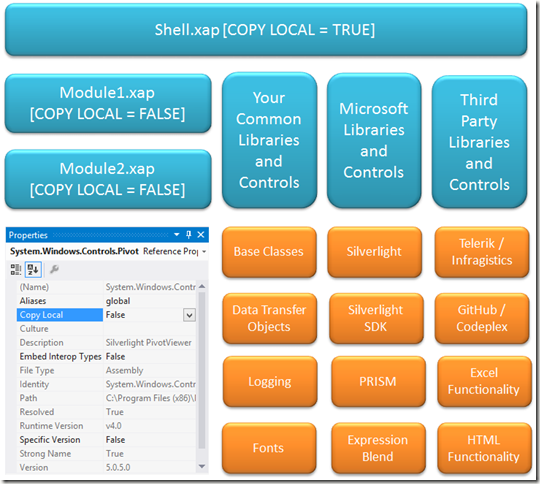
imageFor example this is the Prism extmap.xml file:
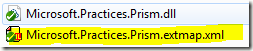
extmap

<?xml version="1.0"?>
<manifest>
<assembly>
<name>Microsoft.Practices.Prism</name>
<version>4.1.0.0</version>
<publickeytoken>31bf3856ad364e35</publickeytoken>
<relpath>Microsoft.Practices.Prism.dll</relpath>
<extension downloadUri="Microsoft.Practices.Prism.zip" />
</assembly>
</manifest>

AppManifest.xaml


This file is contained within each xap file and lets Silverlight know whether dependencies can be found within the xap or externally.


  • The “Deployment.Parts” section contains the libraries with Copy to Local = true.

  • The “Deployment.ExternalParts” section contains libraries with Copy to Local = false.

Note:  When PRISM loads modules it does not automatically download ExternalParts, see here. Here is an example of an AppManifest.xaml file:

<Deployment xmlns="http://schemas.microsoft.com/client/2007/deployment" xmlns:x="http://schemas.microsoft.com/winfx/2006/xaml" EntryPointAssembly="PivotViewerDemo" EntryPointType="PivotViewerDemo.App" RuntimeVersion="5.0.61118.0">
<Deployment.Parts>
<AssemblyPart x:Name="PivotViewerDemo" Source="PivotViewerDemo.dll" />
<AssemblyPart x:Name="System.Xml.Serialization" Source="System.Xml.Serialization.dll" />
<AssemblyPart x:Name="System.Xml.Linq" Source="System.Xml.Linq.dll" />
</Deployment.Parts>
<Deployment.ExternalParts>
<ExtensionPart Source="System.Windows.Controls.zip" />
<ExtensionPart Source="System.Windows.Controls.Pivot.zip" />
</Deployment.ExternalParts>
</Deployment>

Configuring Silverlight application projects (Xap files)


Don’t forget to switch on application library caching for all your Silverlight applications (Shell and module projects).
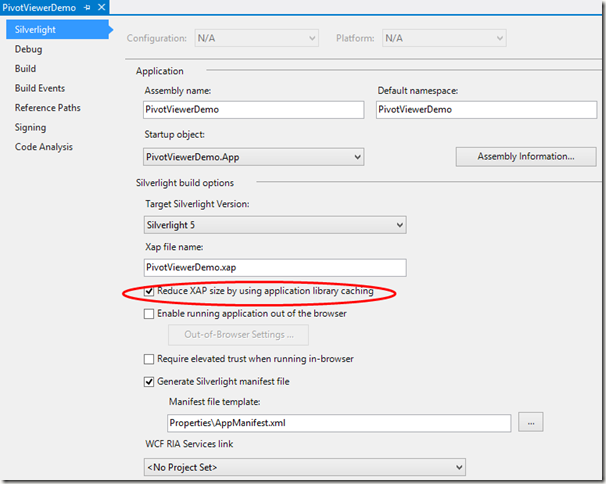
image

How to cache your own Silverlight libraries


Simply sign the library (Project > Properties > Signing) by creating a new key file which requires a password then manually create an extmap.xml file:


image


Where to find the extmap.xml files


If you don’t have access to the extmap.xml files just create them yourself. 


You’ll need to know the assembly version number, right click on the file in Windows Explorer, select properties then click the Details tab.


assembly version


To find out the public key token use the sn.exe (strong name) application that comes with Visual Studio:


sn


See earlier in this blog post for an example of an *.extmap.dll file.


I want to store copies of each of my references within my code base, where can I find the DLLs


While many people use Nuget nowadays you may still wish to store the DLLs files yourself.  Here is a quick lust of locations so you can find them.


The Silverlight “core” libraries do not have to be included in either xap or zip files and can always be set to Copy Local False and do not need to be stored within your code base.


image


Other Microsoft and third party libraries can be added to a libraries (libs) folder within your solution, don’t forget to include the extmap.xml files.  Once the files are installed the Microsoft SDK files can be found here:


image


PRISM libraries can be downloaded from CodePlex:  http://compositewpf.codeplex.com/


Expression libraries can be downloaded from Blend SDK, Blend Service Pack, Silverlight Tools SP1, VS 2010 SP1.