Tuesday, 5 March 2013

Move labels in CSS depending on view size

On a small device I’d like my labels above my textboxes:

On a larger device I’d like my labels to be on the left of my input boxes:

Here’s how:

<html>
<head>
<style>

@media (max-width: 400px) {
#content {
margin: 50px;
}
#labelContainer {
width: 0px;
}
#content label {
display:inline-block;
}
}

@media (max-width: 5000px) {
#content {
margin: 50px;
}
#content label {
display:inline-block;
}
}
</style>
<body>
<div id="content">
<div id="labelContainer">
<label>First name:
<input type="text" />
</label>
</div>
<div id="labelContainer">
<label>
Last name:
<input type="text" />
</label>
</div>
</div>
</body>
</html>

Saturday, 2 March 2013

Calling cross domain without Jsonp

Thanks to Simon Cropp @simoncropp (creator of NotifyPropertyWeaver project amongst other great projects) for pointing out that you shouldn’t need to jump through the hoops of using Jsonp.

http://enable-cors.org

http://www.html5rocks.com/en/tutorials/cors/

http://stevenhollidge.com/blog-source-code/cors   (using Javascript XMLHttpRequest rather than jQuery)

My example was taken from html5rocks website, then stripped back to contain only the cors code

Use this page to test CORS requests:  http://client.cors-api.appspot.com/client

Initially, I had been using jQuery to make my requests but their lack of support for cors with IE had led me down the wrong path:  http://bugs.jquery.com/ticket/8283

To enable CORS on your ASP.NET web server, for example for Web API, you need to add the following to your web.config:

<system.webServer>

<!-- enable cors -->
<httpProtocol>
<customHeaders>
<add name="Access-Control-Allow-Origin" value="*" />
<add name="Access-Control-Allow-Headers" value="Content-Type" />
</customHeaders>
</httpProtocol>
</system.webServer>

How to return Jsonp from WebApi

This allows you to make service requests from jQuery to a different domain (cross site scripting).

1. Add a Formatters folder to your WebApi project and add the following class:

public class JsonpMediaTypeFormatter : JsonMediaTypeFormatter
{
private readonly HttpRequestMessage _request;
private string _callbackQueryParameter;

public JsonpMediaTypeFormatter()
{
SupportedMediaTypes.Add(DefaultMediaType);
SupportedMediaTypes.Add(new MediaTypeHeaderValue("text/javascript"));

MediaTypeMappings.Add(new UriPathExtensionMapping("jsonp", "application/json"));
}

public JsonpMediaTypeFormatter(HttpRequestMessage request)
: this()
{
_request = request;
}

public string CallbackQueryParameter
{
get { return _callbackQueryParameter ?? "callback"; }
set { _callbackQueryParameter = value; }
}

public override MediaTypeFormatter GetPerRequestFormatterInstance(Type type, HttpRequestMessage request, MediaTypeHeaderValue mediaType)
{
if (type == null)
throw new ArgumentNullException("type");
if (request == null)
throw new ArgumentNullException("request");

return new JsonpMediaTypeFormatter(request) { SerializerSettings = SerializerSettings };
}

public override Task WriteToStreamAsync(Type type, object value, Stream stream, HttpContent content, TransportContext transportContext)
{
string callback;
if (IsJsonpRequest(_request, out callback))
{

var writer = new StreamWriter(stream);
writer.Write(callback + "(");
writer.Flush();

return base.WriteToStreamAsync(type, value, stream, content, transportContext).ContinueWith(_ =>
{

//TODO: Inspecting the task status and acting on that is better
writer.Write(")");
writer.Flush();
});
}

return base.WriteToStreamAsync(type, value, stream, content, transportContext);
}

private bool IsJsonpRequest(HttpRequestMessage request, out string callback)
{
callback = null;

if (request == null || request.Method != HttpMethod.Get)
{
return false;
}

var query = HttpUtility.ParseQueryString(request.RequestUri.Query);
callback = query[CallbackQueryParameter];

return !string.IsNullOrEmpty(callback);
}
}
image

2. Add a FormatterConfig class to your App_Start folder

public class FormatterConfig
{
public static void RegisterFormatters(MediaTypeFormatterCollection formatters)
{
formatters.Remove(formatters.JsonFormatter);
formatters.Insert(0, new JsonpMediaTypeFormatter
{
SerializerSettings = new JsonSerializerSettings
{
ContractResolver = new CamelCasePropertyNamesContractResolver()
}
});
}
}
image

3. Update your Global.asax.cs file to register the FormatterConfig

public class WebApiApplication : System.Web.HttpApplication
{
protected void Application_Start()
{
AreaRegistration.RegisterAllAreas();
WebApiConfig.Register(GlobalConfiguration.Configuration);
FilterConfig.RegisterGlobalFilters(GlobalFilters.Filters);
RouteConfig.RegisterRoutes(RouteTable.Routes);
FormatterConfig.RegisterFormatters(GlobalConfiguration.Configuration.Formatters);
}
}

That's it!


How to test your service call


Now your services can be called for Json or Jsonp.


Json


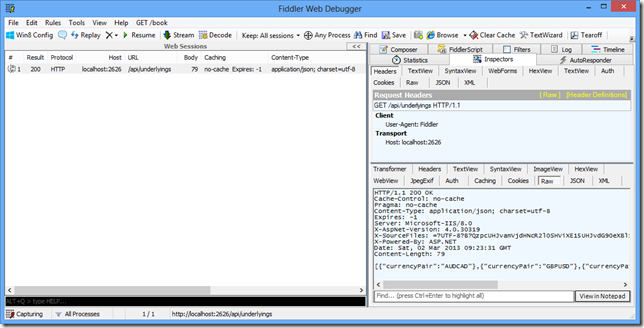
You can continue to get your Json response in the normal way:  http://localhost:2626/api/underlyings


image


image


image


Jsonp


You can now call your service passing in the callback to receive Jsonp:

$.getJSON("http://localhost:2626/api/underlyings/jsonp?callback=?", function (result) {
// process response
});

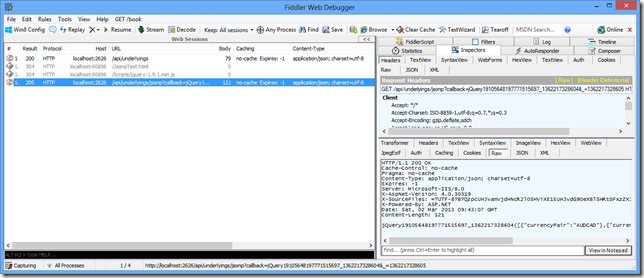
You’ll see here that the response wraps the data in a jQuery function.

image


image


image


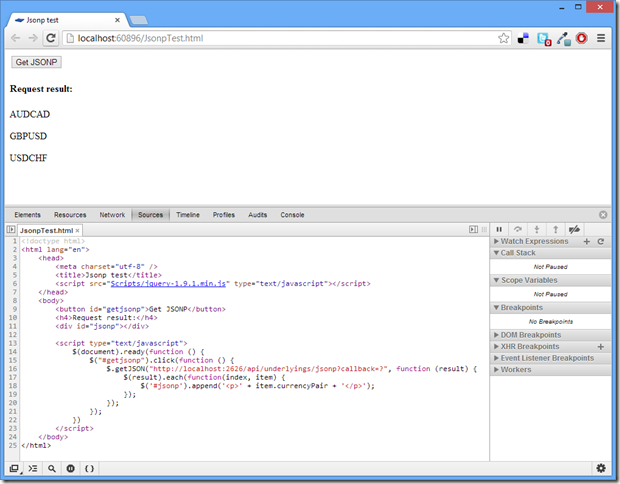
Here’s the HTML code I used in this example:

<!doctype html>
<html lang="en">
<head>
<meta charset="utf-8" />
<title>Jsonp test</title>
<script src="Scripts/jquery-1.9.1.min.js" type="text/javascript"></script>
</head>
<body>
<button id="getjsonp">Get JSONP</button>
<h4>Request result:</h4>
<div id="jsonp"></div>

<script type="text/javascript">
$(document).ready(function () {
$("#getjsonp").click(function () {
$.getJSON("http://localhost:2626/api/underlyings/jsonp?callback=?", function (result) {
$(result).each(function(index, item) {
$('#jsonp').append('<p>' + item.currencyPair + '</p>');
});
});
});
})
</script>
</body>
</html>


For a working downloadable example I recommend downloading the WebApiContrib solution for Jsonp:


https://github.com/WebApiContrib/WebApiContrib.Formatting.Jsonp

Thursday, 28 February 2013

Telerik GridViewCheckBoxColumn

There are two major bugs with checkboxes within grids.

The first is that the control doesn't act normally once it's within the grid. 

For example to change its value takes three clicks before the UI changes from unselected to selected:    

  1. the first click selects/sets focus to the grid 
  2. the second click selects/sets focus to the grid 
  3. the third click finally updates the value

This is solved by setting the AutoSelectOnEdit=”True” and EditTriggers=”CellClick”.

Now you hit the second issue, the model still doesn’t update.

To solve this you need to split out the column to use a CellTemplate and DataTemplate containing a CheckBox control with the IsChecked property bound using UpdateSourceTrigger=PropertyChanged.

Example

This example binds to an "IsDefault" property.

What you would expect to work

<telerik:GridViewCheckBoxColumn DataMemberBinding="{Binding IsActive, Mode=TwoWay}" />


What actually works
<telerik:GridViewCheckBoxColumn AutoSelectOnEdit="True"
EditTriggers="CellClick"
DataMemberBinding="{Binding IsActive, Mode=TwoWay, UpdateSourceTrigger=PropertyChanged }" />

Wednesday, 27 February 2013

Publishing a Windows Phone app

1. Create your app and store the code on GitHub (mine is open source so github and phonegap are free)

2. Use http://build.phonegap.com to generate the xap file, no keys are required.  Download the xap file.

3. Register as a developer with Microsoft around $99 fill out the registration some tax information and your app details:

https://dev.windowsphone.com

4. Wait up to 5 business days…

image

Publishing an Android app to Google Play

Using PhoneGap to build my Android package from GitHub here are the steps to publish to Google Play.

1. Store your app source code in github (mine is open source so github and phonegap build services are free).

2. Install the latest jdk on your computer:  http://www.oracle.com/technetwork/java/javase/downloads/index.html

3. Create a key using the keytool, by opening a command prompt:
cd "C:\Program Files\Java\jdk1.7.0_15\bin"
keytool -genkey -v -keystore itineraryhuntermobile-key.keystore -alias itineraryhuntermobile -keyalg RSA -keysize 2048 -validity 10000

(replacing itineraryhuntermobile with the name of your application)

keytool-1

3. Add your key to phonegap build cloud services:

edit-account

5. Use http://build.phonegap.com to rebuild and download the APK file

Once you’ve assigned your key to the Android section, entered your password which phonegap store for one hour, you can rebuild a release version of your apk file.

build-download

6. Register with Google Play, pay the $25 developer fee and fill out the application details including application screenshots:

https://play.google.com/apps/publish

google-play

7. Wake up the next morning and your app will be in the Google Play store:


google-playapp-store

You can find it in Google Play here:  https://play.google.com/store/apps/details?id=itinerary.hunter.mobile

Tuesday, 26 February 2013

Itinerary Hunter goes mobile!

I’ve open sourced my Itinerary Hunter mobile app.

It’s written in HTML, JavaScript and jQuery mobile with services in PHP connecting to a mySql database.

You can view the site here:  http://stevenhollidge.com/blog-source-code/itineraryhuntermobile

Or download the source code here:  https://github.com/stevenh77/ItineraryHunterMobile

Here are some screenshots:

itineraryhunter-iphone1itineraryhunter-iphone2itineraryhunter-iphone3


This is a great tool for quickly viewing your app on different device sizes: http://quirktools.com/screenfly/

itineraryhunter-screenfly

Sunday, 24 February 2013

Windows Store App Example: Itinerary Hunter

Source: https://github.com/stevenh77/ItineraryHunter-Win8

Using KONA as a framework, you can think of KONA as the Windows 8 equivalent of PRISM, I have created a Windows Store App for Itinerary Hunter.

The solution features distinct projects for UI views, UI logic (view models, converters, etc), services and tests.  Interfaces are used throughout to enable mocking for unit tests.

Here’s some screenshots of the app.

Splash screen

image

Main screen (itineraries grouped by travel categories)

image

Semantic Zoom (grouped by travel categories)

image

Beach

image

Beach category selected, now the sub categories are available

image

Tour du Mont Blanc itinerary selected

image

Delete Bin and Obj folders

Because I dont trust VS, save the following code as a “clean.bat” file in the root folder of your code:

FOR /F "tokens=*" %%G IN ('DIR /B /AD /S bin') DO RMDIR /S /Q "%%G"
FOR /F "tokens=*" %%G IN ('DIR /B /AD /S obj') DO RMDIR /S /Q "%%G"

ApplicationData.Current.TemporaryFolder for Windows Store App

Where is it?  It’s here:

C:\Users\{username}\AppData\Local\Packages\{package-guid}\TempState

Hope this helps someone out!

KendoUI: Example using remote Rest calls

This quick example is best viewed in Chrome as I’m not testing in other browsers.

The Underlyings combo is populated from a NetFlix web rest service call which do films hence the content Smile

Here's the direct link:  http://stevenhollidge.com/blog-source-code/kendoui/index.html

How to change Splash Screen colour Windows Store App

It’s hidden in the Package.appxmanifest file, scroll down and select Splash Screen (on the left hand side).

image

Friday, 8 February 2013

PivotViewer bug

image

If you unload the Silverlight PivotViewer control from Visual Tree whilst it’s in the middle of loading items or an animation such as filtering or resizing, by for example changing the page in a navigation frame Silverlight crashes (see screenshot above).

The same behaviour occurs when the PivotViewer is used within the TabControl (from the Silverlight Toolkit), changing from the PivotViewer in a selected tab exhibits the same behaviour.

PivotViewer Crash Frame Demo:       https://github.com/stevenh77/PivotViewerCrashDemo

PivotViewer Crash TabControl Demo:     https://github.com/stevenh77/PivotViewerCrashTabDemo

If I rework the example and replace the frame/tab control with buttons that show/hide (visible/collapse) each of the pages then no error is thrown.

PivotViewer Working Demo:   https://github.com/stevenh77/PivotViewerWorkingDemo

Dear Microsoft, can we have a fix for the pivot viewer?

This bug has been reported to Microsoft Connect: https://connect.microsoft.com/VisualStudio/feedback/details/778981/silverlight-5-pivot-viewer-crashes-silverlight-when-removed-from-visual-tree

and also on the Silverlight forum:

http://social.msdn.microsoft.com/Forums/en-US/silverlightbugs/thread/74ba1a3e-96db-4225-852b-6b33e4e5d951