Saturday, 16 July 2011

HTML5 Presentations

Google have made available a nice little template for producing a cool style of presentation in HTML5.

You can access my presentation online here:  Presentation

Here’s some screenshots from a presentation of one of my sites ItineraryHunter.com:

ScreenShot100ScreenShot101ScreenShot102ScreenShot099


Another example can be found here:  http://slides.html5rocks.com

The source code for the presentation:  http://code.google.com/p/html5rocks/

Wednesday, 13 July 2011

Visual Round Trip Analyzer

Microsoft’s Visual Round Trip Analyzer (VRTA) helps web developers and testers visualize the performance of a website by providing in depth statistics about it.

You can download the tool here:

http://www.microsoft.com/download/en/details.aspx?displaylang=en&id=21462

Here’s my usual demo website http://footy.cloudapp.net:

ScreenShot095

Here’s an example of the type of information you get back from tool (click on the image to expand):

ScreenShot090ScreenShot091ScreenShot092ScreenShot093ScreenShot094

Monday, 11 July 2011

Google PageSpeed & SpeedTracer

Page Speed

Page Speed is an open-source project started at Google to help developers optimise their web pages by applying web performance best practices and is integrated into the Developer Tools within Google Chrome.

As an example, here is one of my Azure hosted websites running SQL Azure backend viewed in Chrome with Page Speed turned on:

ScreenShot082

Speed Tracer

Speed Tracer is a tool to help you identify and fix performance problems in your web applications. It visualizes metrics that are taken from low level instrumentation points inside of the browser and analyzes them as your application runs. Speed Tracer is available as a Chrome extension and works on all platforms where extensions are currently supported (Windows and Linux).

Using Speed Tracer you are able to get a better picture of where time is being spent in your application. This includes problems caused by JavaScript parsing and execution, layout, CSS style recalculation and selector matching, DOM event handling, network resource loading, timer fires, XMLHttpRequest callbacks, painting, and more.

Here’s an example of Speed Tracer:

ScreenShot084

Conclusions

Everyone likes quick wins, by using these tools against your business apps bottlenecks are made visible within your team.  This is a very powerful and necessary part of development, be sure to include performance tests as part of your normal development and release cycle to measure code impact over time.

Wednesday, 6 July 2011

Comparing ProtoBuf-net Serialisation

ProtoBuf-net is a C# engine for Protocol Buffers, a binary serialisation format created by Google.

The project is written and maintained by Marc Gravell who currently works for Stack Overflow. 

The source for this project can be found here: http://code.google.com/p/protobuf-net/

probuf-net_logo

I’ll be comparing the size of the output along with the speed for serialisation and deserialisation speed for the following methods:

  • Xml Serializer with binary formatter using the [Serializable] attribute
  • Data Contract Xml Serializer using the [DataContract] & [DataMember] attributes
  • Data Contract Json Serializer again using the [DataContract] & [DataMember]
  • ProtoBuf-net v2 BETA (but used by StackOverflow) using the reflection and [ProtoContract] & [ProtoMember] attributes
  • ProtoBuf-net v2 BETA (but used by StackOverflow) using a compiled model with no attributes on my data classes
  • ProtoSharp ALPHA (another C# Protocol Buffers serialisation engine by Torbjorn Gyllebring)

For my tests I’ll be using the following model:

model

Here’s the object model view when populated with data:

Data

Simple to use

Here is an example of how to create a Protobuf-net compiled model as opposed to attributes on the class and fields:

Write and Read from Memory Stream

ScreenShot077

Shared Object References

If you have multiple pointers to the same object you can utilise the graph support added in v2.

This example was taken from a Stack Overflow question answered by Marc Gravell:

http://stackoverflow.com/questions/6063729/does-protocol-buffers-support-serialization-of-object-graphs-with-shared-referenc/6063837#6063837

Conclusion

With Protobuf-net serialisation and deserialisation times are reduced so you should get a quick win out of the box.

If the largest bottleneck in your solution is the transfer speed of data between processes this engine can greatly benefit your project as the data footprint is dramatically reduced.

In order to accurately calculate if your solution would benefit from the use of ProtoBuf-net, you’ll need to set up scenarios that mimic your real world requirements as closely as possible.

Downloads

You can download the source code here:

http://stevenhollidge.com/blog-source-code/Protobuf-net-Tests.zip

Random Test Data Generator

output

Lines with Shaped Endpoints

You can use standard properties on a line to transform a line into a more visually useful construct.

image

This line starts with a triangle and finishes with a rounded edge.

Here’s the Xaml source code used in a WPF example application:

Simple Vanishing Line

Sometimes a dividing line between sections can be useful to visually separate areas on your pages.

To soften the line simply use a linear gradient brush with two transparent ends.

ScreenShot050

Here's the Xaml I used in a WPF example application:

Thursday, 30 June 2011

How to create a Google Chrome extension

This simple example serves to show how you can create your own bespoke Goggle Chrome extension using HTML, Javascript and JSON.

With Extension Installed

When our extension is installed it displays an icon to the left of the favourites star in the URL box (our icon in this case is a blue square with 3D style glasses) and shows a JavaScript alert to the user if the tab is browsing my website http://stevenhollidge.com.

ScreenShot043

There are two types of extensions:

  Browser Extension (notice the icons to the right of the URL box, these browser extensions run all the time)

  Page Action (which is what this example happens to be)

The source code consists of a JSON manifest file, an HTML file containing some JavaScript and three icons:

ScreenShot045

Step 1: Download and Install Google Chrome for Developers

Step 2: Create manifest.json file

Create an empty folder then add a file called manifest.json, here’s my version:

Step 3: Add background.html file

Step 4: Add your icon files

Step 5: Upload your extension to Chrome

Open Chrome and navigate to Chrome://extensions, then click the “Load unpacked extension…” button and select the folder containing your extension files.

ScreenShot042

Debugging your extension

You can debug your Chrome extension by navigating to chrome://extensions (see screenshot above) and click the background.html link below Inspect active views which will open Google Developer Tools where you can place breakpoints to step through your code:

ScreenShot048

You can download the source code here:

http://stevenhollidge.com/blog-source-code/ChromeExtension-CheckForMyWebsite.zip

Sunday, 19 June 2011

Silverlight Debugging Tools

Here’s some of the tools I use to debug my Silverlight Out of Browser applications and track memory consumption for Silverlight applications. 
When the app starts up the user is shown the login screen.  In the background, whilst the user logs in, various xap files are being downloaded asynchronously.
ScreenShot034

Here’s how the tools look on start up of the application, note no Xap optimisation tools or minifiers have been used.


HTTP Traffic


Fiddler (free)

This tool is pretty common among all web devs and tracks HTTP traffic.  From this screenshot (tracking the startup of the application) we can see various external xap file requests are made to the localhost.
ScreenShot033

XAML and Resources


Silverlight Spy (commercial)

ScreenShot037

Memory Analysis


VMMap (free as part of SysInternals Tools Suite)


Select the process, in this case sllauncher.exe as it’s an out of browser application.

ScreenShot035
Here we can see the memory used by the application:
Heap – Native heap usage
Managed Heap – Silverlight and CLR heap memory usage
Image – Modules loaded
Stack – Silverlight and CLR stack memory usage
ScreenShot036

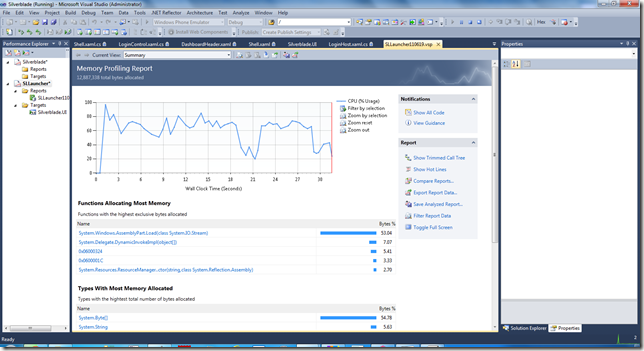
Visual Studio 2010 Profiling (Ultimate SKU)


Memory Profiling


ScreenShot038

CPU Profiling
ScreenShot039

WinDbg + SoS (Son of strike)

To be updated.

dotNet memory profiler (commercial)

To be updated.

CLR Profiler for Silverlight 4 and .NET 4 (free)


To be updated.


XPerf / HeapMonitor cmd –p %pid%

For native / unmanaged memory, to be updated.

Mike Cook is one of the leading authorities on Silverlight performance and someone to closely follow.


You can find his list of Silverlight best practises here:


http://blogs.msdn.com/b/slperf/p/resources.aspx

Dynamic UI in Silverlight

Sometimes you may need a UI that’s dynamically loaded perhaps from meta data stored in a database or some other repository.  There are two ways to do this in Silverlight code:

1) Create the .Net objects and attach them to the relevant LayoutRoot

2) Create a block of raw Xaml and load that into the relevant LayoutRoot

Here’s an example of a page that can use both methods to produce a simple bar chart:

ScreenShot019

Perhaps this is not the most visually stunning example but you can apply this technique to dynamically build your UI forms with textboxes and combos in a similar fashion to MVC scaffolding.

The Code

To download the source code click here:

http://stevenhollidge.com/blog-source-code/SilverlightDynamicUI.zip

Saturday, 18 June 2011

Composite apps with Prism

In this example I have used Prism to dynamically load xap files in the background after the initial landing page has loaded.

ScreenShot015

Here’s the same page with the Prism xap loader log switched on and configured to output to the screen.  You can see messages updating the developer on the sequence of operations such as the creation of the Unity container and tracking for each of the separate xap modules throughout their download and initialisation.

ScreenShot014

The application shell or display is broken down into three areas: 

The header

Containing the Company/Product name along with some user buttons for comments, settings, user details, log out and help.  This header is initially collapsed for the login screen and is made visible once the user successfully logs in.

Main content pane

In the example below the charts section has been selected from the main menu and displayed.

The footer

The footer contains the main menu to allow the user to load the content pane with various areas of functionality.  This section is also initially collapsed until the user has logged in.

Note in the screenshot below the logger output to screen has been switched off.

ScreenShot017

The XAPs

Each of the menu options is broken out into it’s own Xap file (separate Silverlight project) and can have their entry point / initial view loaded into the content pane via the messaging architecture.  Event the menu itself is a xap file that is loaded asynchronously whilst the user is preparing to login.

You can download the source for this code here:

http://stevenhollidge.com/blog-source-code/Silverblade-Prism.7z

Thursday, 16 June 2011

Agile RESTful Json in Silverlight

Following on from my previous post (Consuming POX in Silverlight), here’s a simple example of consuming a Json data service.

ScreenShot012

Data file (exposed via Http Handler on Web Server)

[
{
name:'Shredded Wheat',
price:4.95,
description:'Two per serving with skimmed milk',
calories:650
},
{
name:'Fresh Fruit Salad',
price:5.95,
description:'Strawberries, bananas, apples and pears',
calories:400
},
{
name:'Scrambled Eggs on Toast',
price:3.95,
description:'Two eggs on two slices of wholewheat toast',
calories:300
},
{
name:'Bacon Roll',
price:2.5,
description:'Three slices of lean bacon in a granary roll',
calories:600
},
{
name:'Homestyle Breakfast',
price:12.95,
description:'Two eggs, bacon, sausage, toast and orange juice',
calories:950
}
]

Http Handler (on Web Server)

using System.IO;
using System.Web;

namespace AgileREST.Web
{
public class FoodService : IHttpHandler
{

public void ProcessRequest(HttpContext context)
{
var dataPath = HttpContext.Current.Server.MapPath("Food.json");

using (var reader = new StreamReader(dataPath))
{
var result = reader.ReadToEnd();
context.Response.ContentType = "text/json";
context.Response.Write(result);
}
}

public bool IsReusable
{
get
{
return false;
}
}
}
}

Mapping (on the client)

namespace AgileREST
{
public class Food
{
public string Name { get; set; }
public decimal Price { get; set; }
public string Description { get; set; }
public int Calories { get; set; }
}
}

Service Call (on the client)

using System;
using System.Collections.Generic;
using System.Json;
using System.Linq;
using System.Net;
using System.Runtime.Serialization.Json;
using System.Windows;
using System.Windows.Browser;
using System.Windows.Controls;

namespace AgileREST
{
public partial class MainPage : UserControl
{
public MainPage()
{
InitializeComponent();
}

void webClientForJson_OpenReadCompleted(object sender, OpenReadCompletedEventArgs e)
{
if (e.Error != null) return;

// first option
JsonArray foods = (JsonArray)JsonArray.Load(e.Result);
var query = from food in foods
select new Food()
{
Name = (string)food["name"],
Price = (decimal)food["price"],
Description = (string)food["description"],
Calories = (int)food["calories"]
};
listboxFoodJson.ItemsSource = query.ToList();

// second option
// for implicit serialisation requires identical case sensitive name across Json and C# food objects)
//DataContractJsonSerializer jsonSerializer = new DataContractJsonSerializer(typeof(List<Food>));
//List<Food> foods = (List<Food>) jsonSerializer.ReadObject(e.Result);
//listboxFoodJson.ItemsSource = foods;
}

private void btnGetFoodJson_Click(object sender, RoutedEventArgs e)
{
WebClient webClientForXml = new WebClient();
webClientForXml.OpenReadCompleted += webClientForJson_OpenReadCompleted;
webClientForXml.OpenReadAsync(new Uri(HtmlPage.Document.DocumentUri, "FoodService.ashx"));
}
}
}

Data binding (on the client)

<UserControl x:Class="AgileREST.MainPage"
xmlns="http://schemas.microsoft.com/winfx/2006/xaml/presentation"
xmlns:x="http://schemas.microsoft.com/winfx/2006/xaml"
xmlns:d="http://schemas.microsoft.com/expression/blend/2008"
xmlns:mc="http://schemas.openxmlformats.org/markup-compatibility/2006"
mc:Ignorable="d"
d:DesignHeight="300" d:DesignWidth="700">

<UserControl.Resources>
<DataTemplate x:Key="itemTemplate">
<StackPanel Orientation="Horizontal">
<TextBlock x:Name="tbName"
Width="170"
Text="{Binding Path=Name}" />
<TextBlock x:Name="tbPrice"
Width="50"
Text="{Binding Path=Price}" />
<TextBlock x:Name="tbDescription"
Width="300"
Text="{Binding Path=Description}" />
<TextBlock x:Name="tbCalories"
Width="50"
Text="{Binding Path=Calories}" />
</StackPanel>
</DataTemplate>
</UserControl.Resources>

<Grid x:Name="LayoutRoot" Background="White">
<StackPanel Width="600" Margin="10">
<TextBlock Text="Json Example" Margin="5" />
<StackPanel x:Name="ColumnDescriptions" Orientation="Horizontal" Margin="5" >
<TextBlock Text="Name" Width="170" />
<TextBlock Text="Price" Width="50" />
<TextBlock Text="Description" Width="300" />
<TextBlock Text="Calories" Width="50" />
</StackPanel>
<ListBox x:Name="listboxFoodJson"
Height="150"
Margin="5"
ItemTemplate="{StaticResource itemTemplate}" />
<Button x:Name="btnGetFoodJson"
Height="50"
Margin="5"
Click="btnGetFoodJson_Click"
Content="Get Food From Json Service" />
</StackPanel>
</Grid>
</UserControl>

You can download the source code from the following link:


http://stevenhollidge.com/blog-source-code/AgileREST.zip

Consuming POX in Silverlight

We have the simple scenario of a web server exposing a menu data as plain old xml (POX).  Our Silverlight application would like to consume this data and display it in a simple list box. 

Here’s how it’s done:

ScreenShot010

Data file (directly exposed on web server)

Mapping (on client)

Service Call (on client)

Data Binding (on client)

It’s as easy as that.

You can download the source code here:

http://stevenhollidge.com/blog-source-code/SilverlightXmlService.zip