I’ve written a quick Silverlight application that listens to a WCF Service streaming a fire hose of the latest Fx prices at a rate of 1,200 per minute.
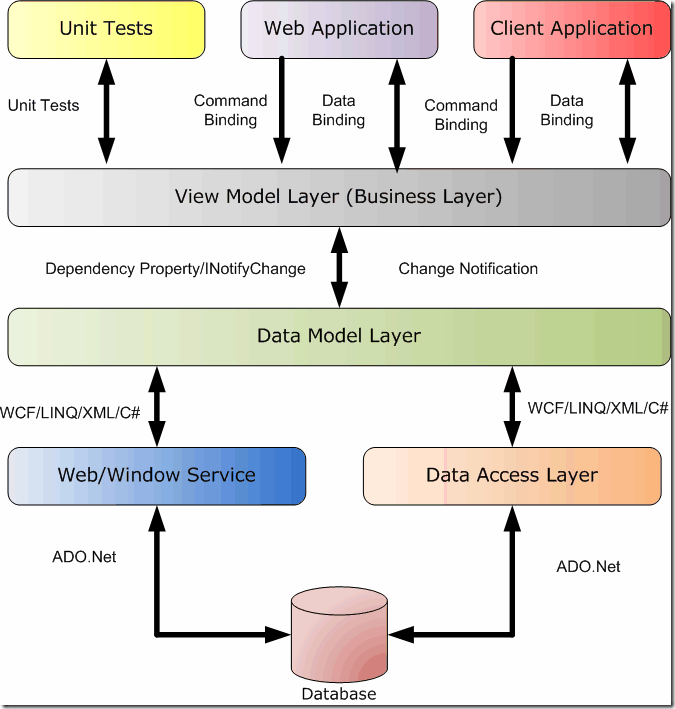
The application showcases the MVVM pattern, makes use of MVVMLight Toolkit and features the cosmopolitan/metro theme.
![ScreenShot072_thumb[5]](https://blogger.googleusercontent.com/img/b/R29vZ2xl/AVvXsEhPko8zLLtveZxu9d1bXDeNuuct7PhPq8FAe764rhs9pYPdu2HIVbiINEpvoeHx3I7eRybjswoiqMBAmAUEJh7ejR1li1WU22SnuzaCqV9rd-lCgLrawhGCI2NwXJNkXjxdQ6GGbhF_J2g/?imgmax=800 "ScreenShot072_thumb[5]")
The Service
The WCF service exposes a pub/sub model with a call back for each new FX Rate price:
using System;
using System.ServiceModel;
using System.Threading;
using System.Threading.Tasks;

namespace PricingServiceHost
{
    [ServiceBehavior(InstanceContextMode=InstanceContextMode.Single)]
    public class PricingService : IPricingService
    {
        static PricingService()
        {
            Task.Factory.StartNew(() =>
                {
                    var factory = new PriceFactory();
                    while (true)
                    {
                        Thread.Sleep(50);
                        if (PriceUpdate == null) continue;
                        FxRate latestPrice = factory.GetNextPrice();

                        PriceUpdate(
                            null,
                            new PriceUpdateEventArgs
                                {
                                    LatestPrice = latestPrice
                                });
                    }
                });
        }

        static event EventHandler<PriceUpdateEventArgs> PriceUpdate;

        IPricingServiceCallback _callback;

        public void Subscribe()
        {
            _callback = OperationContext.Current.GetCallbackChannel<IPricingServiceCallback>();
            PriceUpdate += PricingService_PriceUpdate;
        }

        public void UnSubscribe()
        {
            PriceUpdate -= PricingService_PriceUpdate;
        }

        void PricingService_PriceUpdate(object sender, PriceUpdateEventArgs e)
        {
            if (((ICommunicationObject)_callback).State == CommunicationState.Opened)
            {
                try
                {
                    _callback.PriceUpdate(e.LatestPrice);
                }
                catch
                {
                    UnSubscribe();
                }
            }
            else
            {
                UnSubscribe();
            }
        }
    }
}
The Model (M)
using System;
using System.Collections.ObjectModel;
using GalaSoft.MvvmLight;

namespace MetroPricingSample.Models
{
    public class DisplayFxRate : ObservableObject
    {
        public static ObservableCollection<DisplayFxRate> InitialRates = new ObservableCollection<DisplayFxRate>
            {
                new DisplayFxRate("AUD", (decimal) 0.93272),
                new DisplayFxRate("BRL", (decimal) 1.58100),
                new DisplayFxRate("CAD", (decimal) 0.97495),
                new DisplayFxRate("CHF", (decimal) 0.83603),
                new DisplayFxRate("CNY", (decimal) 0.15425),
                new DisplayFxRate("EUR", (decimal) 0.68103),
                new DisplayFxRate("GBP", (decimal) 0.60819),
                new DisplayFxRate("INR", (decimal) 44.6300),
                new DisplayFxRate("JPY", (decimal) 80.0032),
                new DisplayFxRate("NZD", (decimal) 1.21847),
                new DisplayFxRate("RUB", (decimal) 27.7411),
                new DisplayFxRate("THB", (decimal) 0.03303),
                new DisplayFxRate("ZAR", (decimal) 6.71610)
            };

        public DisplayFxRate() { }

        public DisplayFxRate(string isoCode, decimal rate)
        {
            IsoCode = isoCode;
            PreviousRate = rate;
            CurrentRate = rate;
            Updated = DateTime.Now;
        }

        public const string IsoCodePropertyName = "IsoCode";
        private string _isoCode = string.Empty;
        public string IsoCode
        {
            get { return _isoCode; }

            set
            {
                if (_isoCode == value) return;
                _isoCode = value;
                RaisePropertyChanged(IsoCodePropertyName);
            }
        }

        public const string PreviousRatePropertyName = "PreviousRate";
        private decimal _previousRate = 0;
        public decimal PreviousRate
        {
            get { return _previousRate; }

            set
            {
                if (_previousRate == value) return;
                _previousRate = value;
                RaisePropertyChanged(PreviousRatePropertyName);
            }
        }

        public const string CurrentRatePropertyName = "CurrentRate";
        private decimal _currentRate = 0;
        public decimal CurrentRate
        {
            get { return _currentRate; }

            set
            {
                if (_currentRate == value) return;

                _previousRate = _currentRate;
                _currentRate = value;

                RaisePropertyChanged(PreviousRatePropertyName);
                RaisePropertyChanged(CurrentRatePropertyName);
                RaisePropertyChanged(DeltaPropertyName);
                RaisePropertyChanged(StatusPropertyName);
            }
        }


        public const string DeltaPropertyName = "Delta";
        public decimal Delta
        {
            get
            {
                decimal result;

                if (PreviousRate == 0 || CurrentRate == 0)
                    result = 0;
                else
                    result = Math.Round(((CurrentRate / PreviousRate) - 1), 2);

                return result;
            }
        }

        public const string StatusPropertyName = "Status";
        public Status Status
        {
            get
            {
                Status status;
                var delta = Delta;

                if (delta > 0)
                    status = Status.Increase;
                else if (delta < 0)
                    status = Status.Decrease;
                else
                    status = Status.NoChange;

                return status;
            }
        }

        public const string UpdatedPropertyName = "Updated";
        private DateTime _updated = DateTime.MinValue;
        public DateTime Updated
        {
            get { return _updated; }

            set
            {
                if (_updated == value) return;
                _updated = value;
                RaisePropertyChanged(UpdatedPropertyName);
            }
        }
    }
}
The View (V)
<navigation:Page x:Class="MetroPricingSample.Views.Pricing"
                 xmlns="http://schemas.microsoft.com/winfx/2006/xaml/presentation"
                 xmlns:x="http://schemas.microsoft.com/winfx/2006/xaml"
                 xmlns:d="http://schemas.microsoft.com/expression/blend/2008"
                 xmlns:mc="http://schemas.openxmlformats.org/markup-compatibility/2006"
                 xmlns:navigation="clr-namespace:System.Windows.Controls;assembly=System.Windows.Controls.Navigation"
                 xmlns:Converters="clr-namespace:MetroPricingSample.Converters"
                 d:DesignHeight="300"
                 d:DesignWidth="640"
                 DataContext="{Binding PricingViewModel, Source={StaticResource Locator}}"
                 Style="{StaticResource PageStyle}"
                 mc:Ignorable="d">
  <Grid x:Name="LayoutRoot">
    <Grid.RowDefinitions>
      <RowDefinition Height="60" />
      <RowDefinition Height="30" />
      <RowDefinition Height="*" />
    </Grid.RowDefinitions>
    <Grid.Resources>
      <Converters:BoolToSubscribedTextConverter x:Key="BoolToSubscribedTextConverter" />
      <Converters:StatusToIconConverter x:Key="StatusToIconConverter" />
      <Converters:IsoCodeToFlagConverter x:Key="IsoCodeToFlagConverter" />
      <Converters:DateTimeToTimeConverter x:Key="DateTimeToTimeConverter" />
    </Grid.Resources>

    <StackPanel Grid.Row="0">
      <Button x:Name="btnSubscribe"
              Width="200"
              Height="30"
              HorizontalAlignment="Left"
              Content="{Binding Subscribed, Converter={StaticResource BoolToSubscribedTextConverter}}"
              Command="{Binding SubscriptionCommand, Mode=TwoWay}" />
      <TextBlock x:Name="tbInfo" Height="30" Text="{Binding ErrorText}"/>

    </StackPanel>
    <StackPanel Grid.Row="1" Orientation="Horizontal">
      <TextBlock Text="Currency" Width="85" Margin="10,0,0,0"/>
      <TextBlock Text="Previous" Width="100"/>
      <TextBlock Text="Current" Width="100" />
      <TextBlock Text="Delta" Width="160" />
      <TextBlock Text="Updated" />
    </StackPanel>
    <ListBox x:Name="lbFxRates"
             ItemsSource="{Binding Path=Rates}"
             Grid.Row="2">
      <ListBox.ItemTemplate>
        <DataTemplate>
          <StackPanel Orientation="Horizontal">
            <Image Source="{Binding IsoCode, Converter={StaticResource IsoCodeToFlagConverter}}" Width="20" Margin="10,0,0,0"/>
            <TextBlock Text="{Binding IsoCode}" Width="50" Margin="10,0,0,0"/>
            <TextBlock Text="{Binding PreviousRate}" Width="100" />
            <TextBlock Text="{Binding CurrentRate}" Width="100" />
            <TextBlock Text="{Binding Delta}" Width="100" HorizontalAlignment="Right" Margin="0,0,10,0" />
            <Image Source="{Binding Status, Converter={StaticResource StatusToIconConverter}}" Width="20"  />
            <TextBlock Text="{Binding Updated, Converter={StaticResource DateTimeToTimeConverter}}" Width="200" Margin="30,0,0,0" />
          </StackPanel>
        </DataTemplate>
      </ListBox.ItemTemplate>
    </ListBox>
  </Grid>
</navigation:Page>
The View Model (VM)
The view model in the client currently uses a generated proxy for the WCF service, we I really don’t like, this will be removed in the next refactoring iteration.
using System;
using System.Collections.ObjectModel;
using System.Linq;
using System.Windows.Input;
using GalaSoft.MvvmLight;
using GalaSoft.MvvmLight.Command;
using MetroPricingSample.Models;
using MetroPricingSample.ServiceReference1;

namespace MetroPricingSample.ViewModels
{
    public class PricingViewModel : ViewModelBase
    {
        public ObservableCollection<DisplayFxRate> Rates { get; set; }

        private const string SubscribedPropertyName = "Subscribed";
        private bool _subscribed = false;

        public bool Subscribed
        {
            get { return _subscribed; }

            set
            {
                if (_subscribed == value)
                {
                    return;
                }

                _subscribed = value;
                RaisePropertyChanged(SubscribedPropertyName);
            }
        }

        private const string ErrorTextPropertyName = "ErrorText";
        private string _errorText = string.Empty;

        public string ErrorText
        {
            get { return _errorText; }

            set
            {
                if (_errorText == value)
                {
                    return;
                }

                _errorText = value;
                RaisePropertyChanged(ErrorTextPropertyName);
            }
        }


        public ICommand SubscriptionCommand { get; set; }

        private bool _subscriptionCommand_CanExecute = true;

        private PricingServiceClient _client;

        public PricingViewModel()
        {
            Rates = DisplayFxRate.InitialRates;

            if (IsInDesignMode) return;

            _client = new PricingServiceClient();
            _client.SubscribeCompleted += _client_SubscribeCompleted;
            _client.UnSubscribeCompleted += _client_UnSubscribeCompleted;
            _client.PriceUpdateReceived += PriceUpdate;
            SubscriptionCommand = new RelayCommand(SubscriptionCommand_Execute, () => _subscriptionCommand_CanExecute);
        }

        void SubscriptionCommand_Execute()
        {
            if (!Subscribed)
            {
                _client.SubscribeAsync();
            }
            else
            {
                _client.UnSubscribeAsync();
            }

            _subscriptionCommand_CanExecute = false;
        }

        void _client_UnSubscribeCompleted(object sender, System.ComponentModel.AsyncCompletedEventArgs e)
        {
            if (e.Error == null)
            {
                Subscribed = false;
                ErrorText = "";
            }
            else
            {
                ErrorText = "Unable to connect to service.";
            }

            _subscriptionCommand_CanExecute = true;
        }

        void _client_SubscribeCompleted(object sender, System.ComponentModel.AsyncCompletedEventArgs e)
        {
            if (e.Error == null)
            {
                Subscribed = true;
                ErrorText = "";
            }
            else
            {
                ErrorText = "Unable to connect to service.";
            }

            _subscriptionCommand_CanExecute = true;
        }

        public void PriceUpdate(object sender, PriceUpdateReceivedEventArgs e)
        {
            if (Subscribed)
            {
                PriceUpdate(e.fxRate);
            }
        }

        public void PriceUpdate(FxRate fxRate)
        {
            try
            {
                foreach (var rate in Rates.Where(rate => rate.IsoCode == fxRate.IsoCode))
                {
                    rate.CurrentRate = fxRate.Rate;
                    rate.Updated = fxRate.Updated;
                }
            }
            catch (Exception e)
            {
                //log here
            }
        }
    }
}
Conclusion
The application currently uses MVVM Light on the client side and WCF for the server side service. The GUI is struggling to keep up with the service so I plan to introduce the Telerik Grid Control to see how it deals with the updates. The functionality currently provided by value converters will be moved out of the view and into the view model and I’ll also refactor the application to use a REST interface with Service Stack (written by Demis Bellot).
You can download the source code here:
https://github.com/stevenh77/MetroPricingSample
When you run the application, be sure to set the Web host and Service to both start up at runtime (right click on solution > Properties > Multiple Startup Projects > START both MetroPricingSample.Web and PricingServiceHost).
Note: As I’m looking purely at performance I’ve deliberately omitted tests and some of the error handling and graceful dereferencing, I’ll add these as I refactor later on.




![ScreenShot072_thumb[5]](https://blogger.googleusercontent.com/img/b/R29vZ2xl/AVvXsEjbRGBBeXvDbSI_OCSINh-EANAEHtOGG-smH1TkINIkK78OR7ybYPzXYMdfk_4EPG36IpNRK6hI1TnztVjwTWJ0HhYlEJhqz_ErT4ncMkWNbMrKsu7GIyrkVMDNUw3QM5428WMYuMbWiFM/s1600-h/ScreenShot072_thumb%25255B5%25255D%25255B4%25255D.png "ScreenShot072_thumb[5]")
