This allows you to make service requests from jQuery to a different domain (cross site scripting).
1. Add a Formatters folder to your WebApi project and add the following class:
public class JsonpMediaTypeFormatter : JsonMediaTypeFormatter
{
    private readonly HttpRequestMessage _request;
    private string _callbackQueryParameter;

    public JsonpMediaTypeFormatter()
    {
        SupportedMediaTypes.Add(DefaultMediaType);
        SupportedMediaTypes.Add(new MediaTypeHeaderValue("text/javascript"));

        MediaTypeMappings.Add(new UriPathExtensionMapping("jsonp", "application/json"));
    }

    public JsonpMediaTypeFormatter(HttpRequestMessage request)
        : this()
    {
        _request = request;
    }

    public string CallbackQueryParameter
    {
        get { return _callbackQueryParameter ?? "callback"; }
        set { _callbackQueryParameter = value; }
    }

    public override MediaTypeFormatter GetPerRequestFormatterInstance(Type type, HttpRequestMessage request, MediaTypeHeaderValue mediaType)
    {
        if (type == null)
            throw new ArgumentNullException("type");
        if (request == null)
            throw new ArgumentNullException("request");

        return new JsonpMediaTypeFormatter(request) { SerializerSettings = SerializerSettings };
    }

    public override Task WriteToStreamAsync(Type type, object value, Stream stream, HttpContent content, TransportContext transportContext)
    {
        string callback;
        if (IsJsonpRequest(_request, out callback))
        {

            var writer = new StreamWriter(stream);
            writer.Write(callback + "(");
            writer.Flush();

            return base.WriteToStreamAsync(type, value, stream, content, transportContext).ContinueWith(_ =>
            {

                //TODO: Inspecting the task status and acting on that is better
                writer.Write(")");
                writer.Flush();
            });
        }

        return base.WriteToStreamAsync(type, value, stream, content, transportContext);
    }

    private bool IsJsonpRequest(HttpRequestMessage request, out string callback)
    {
        callback = null;

        if (request == null || request.Method != HttpMethod.Get)
        {
            return false;
        }

        var query = HttpUtility.ParseQueryString(request.RequestUri.Query);
        callback = query[CallbackQueryParameter];

        return !string.IsNullOrEmpty(callback);
    }
}

2. Add a FormatterConfig class to your App_Start folder
public class FormatterConfig
{
    public static void RegisterFormatters(MediaTypeFormatterCollection formatters)
    {
        formatters.Remove(formatters.JsonFormatter);
        formatters.Insert(0, new JsonpMediaTypeFormatter
        {
            SerializerSettings = new JsonSerializerSettings
            {
                ContractResolver = new CamelCasePropertyNamesContractResolver()
            }
        });
    }
}

3. Update your Global.asax.cs file to register the FormatterConfig
public class WebApiApplication : System.Web.HttpApplication
{
    protected void Application_Start()
    {
        AreaRegistration.RegisterAllAreas();
        WebApiConfig.Register(GlobalConfiguration.Configuration);
        FilterConfig.RegisterGlobalFilters(GlobalFilters.Filters);
        RouteConfig.RegisterRoutes(RouteTable.Routes);
        FormatterConfig.RegisterFormatters(GlobalConfiguration.Configuration.Formatters);
    }
}
That's it!
How to test your service call
Now your services can be called for Json or Jsonp.
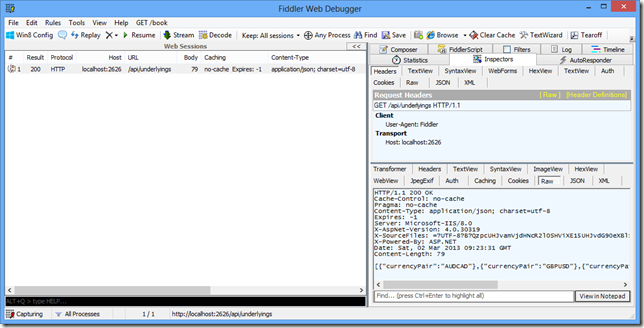
Json
You can continue to get your Json response in the normal way: http://localhost:2626/api/underlyings


Jsonp
You can now call your service passing in the callback to receive Jsonp:
$.getJSON("http://localhost:2626/api/underlyings/jsonp?callback=?", function (result) {
  // process response
});
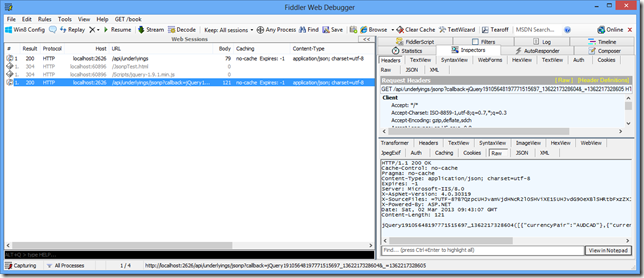
You’ll see here that the response wraps the data in a jQuery function.

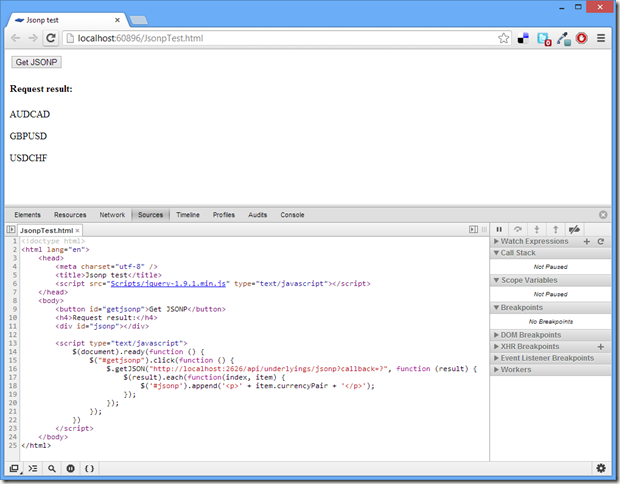
Here’s the HTML code I used in this example:
<!doctype html>
<html lang="en">
    <head>
        <meta charset="utf-8" />
        <title>Jsonp test</title>
        <script src="Scripts/jquery-1.9.1.min.js" type="text/javascript"></script>
    </head>
    <body>
        <button id="getjsonp">Get JSONP</button>
        <h4>Request result:</h4>
        <div id="jsonp"></div>

        <script type="text/javascript">
            $(document).ready(function () {
                $("#getjsonp").click(function () {
                    $.getJSON("http://localhost:2626/api/underlyings/jsonp?callback=?", function (result) {
                        $(result).each(function(index, item) {
                            $('#jsonp').append('<p>' + item.currencyPair + '</p>');
                        });
                    });
                });
            })
        </script>
    </body>
</html>
For a working downloadable example I recommend downloading the WebApiContrib solution for Jsonp:
https://github.com/WebApiContrib/WebApiContrib.Formatting.Jsonp


